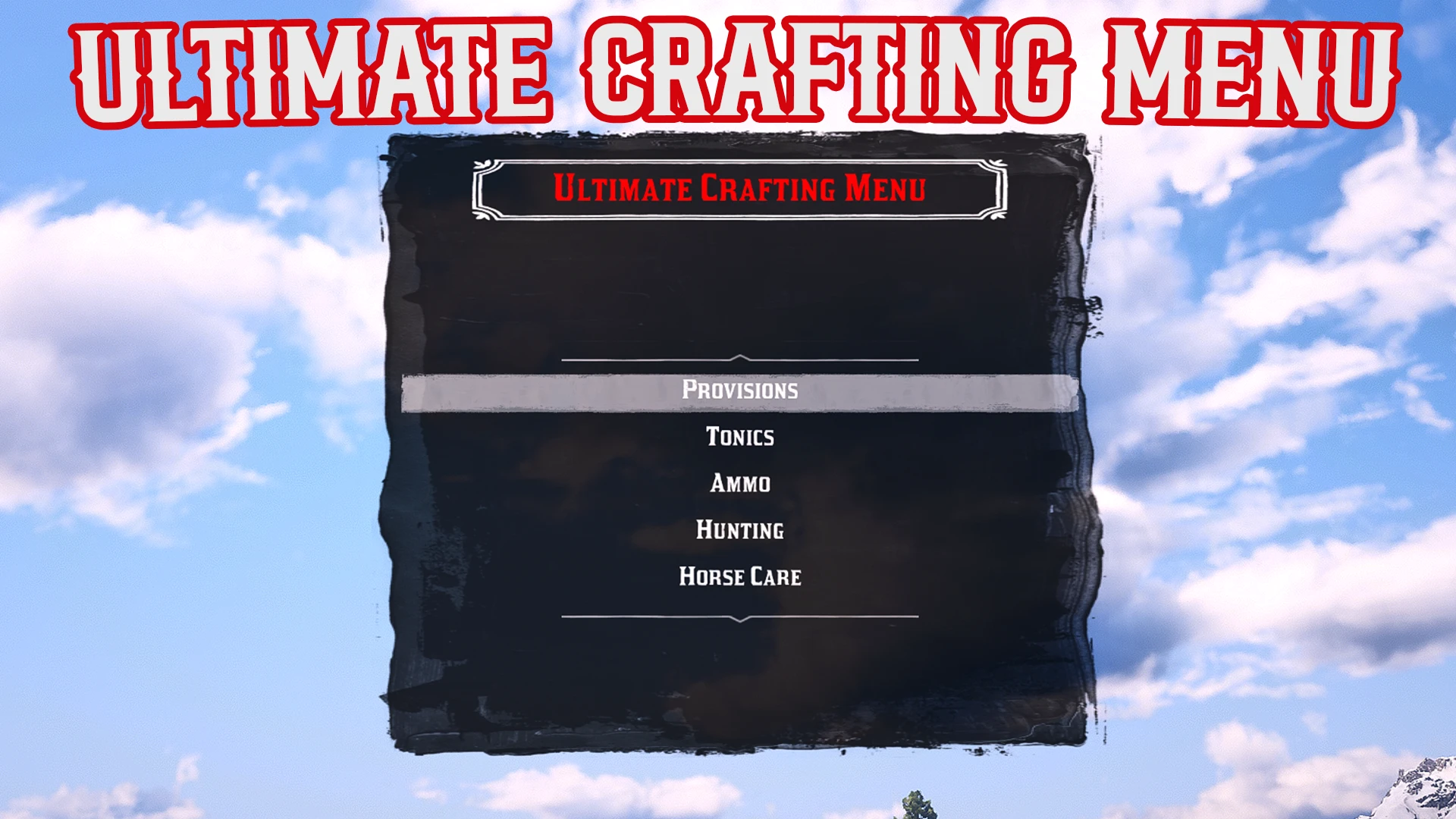
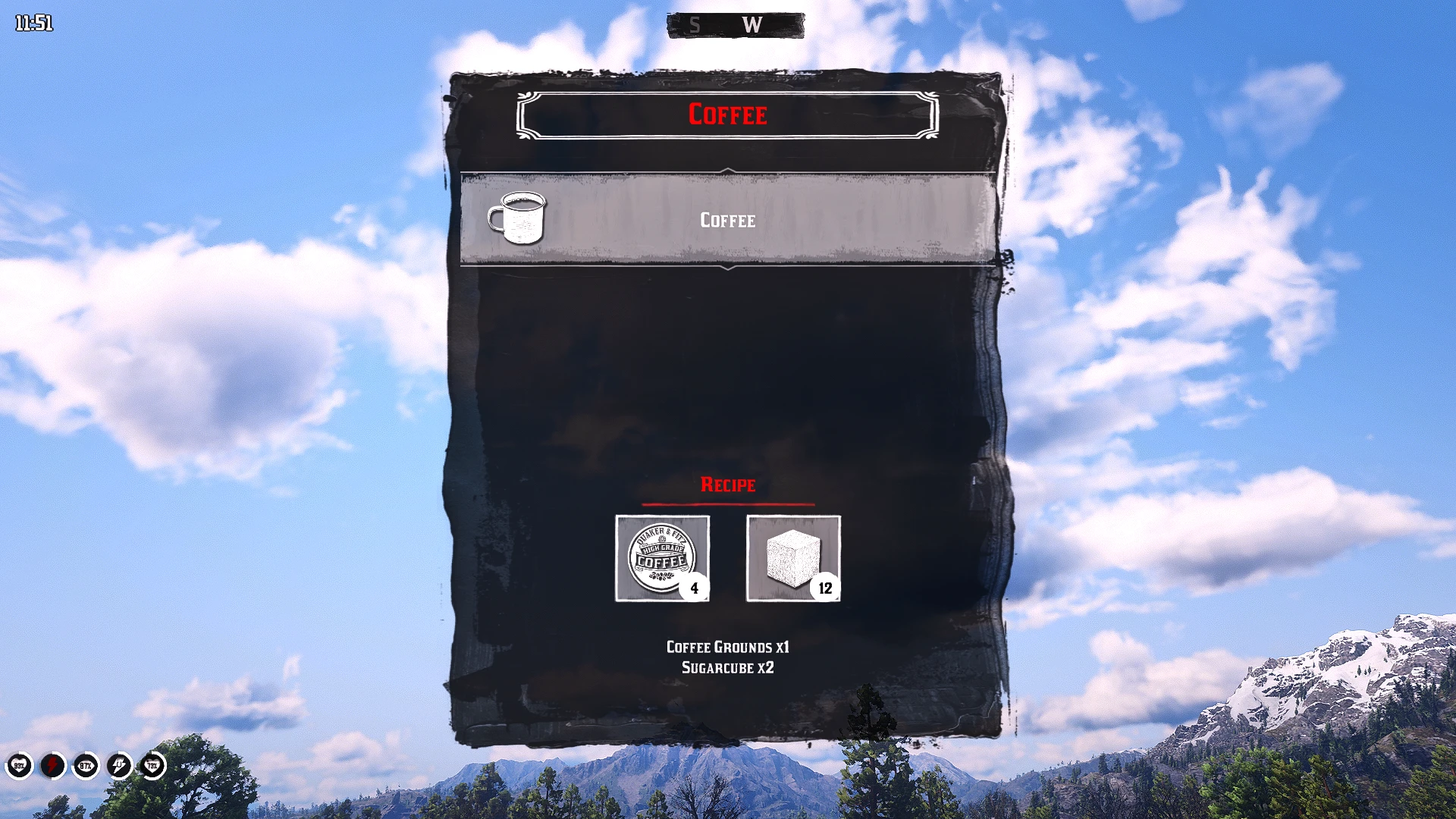
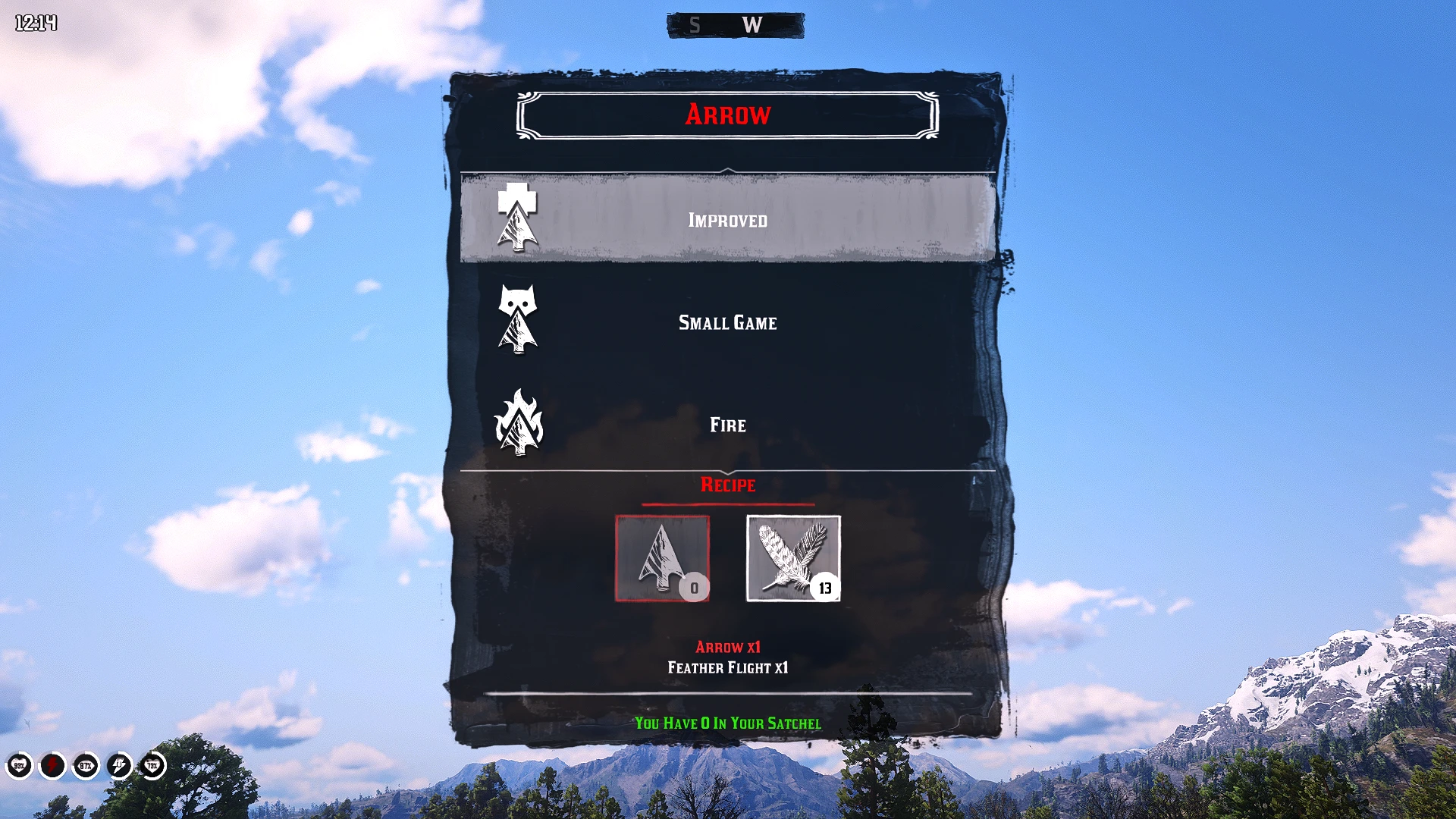
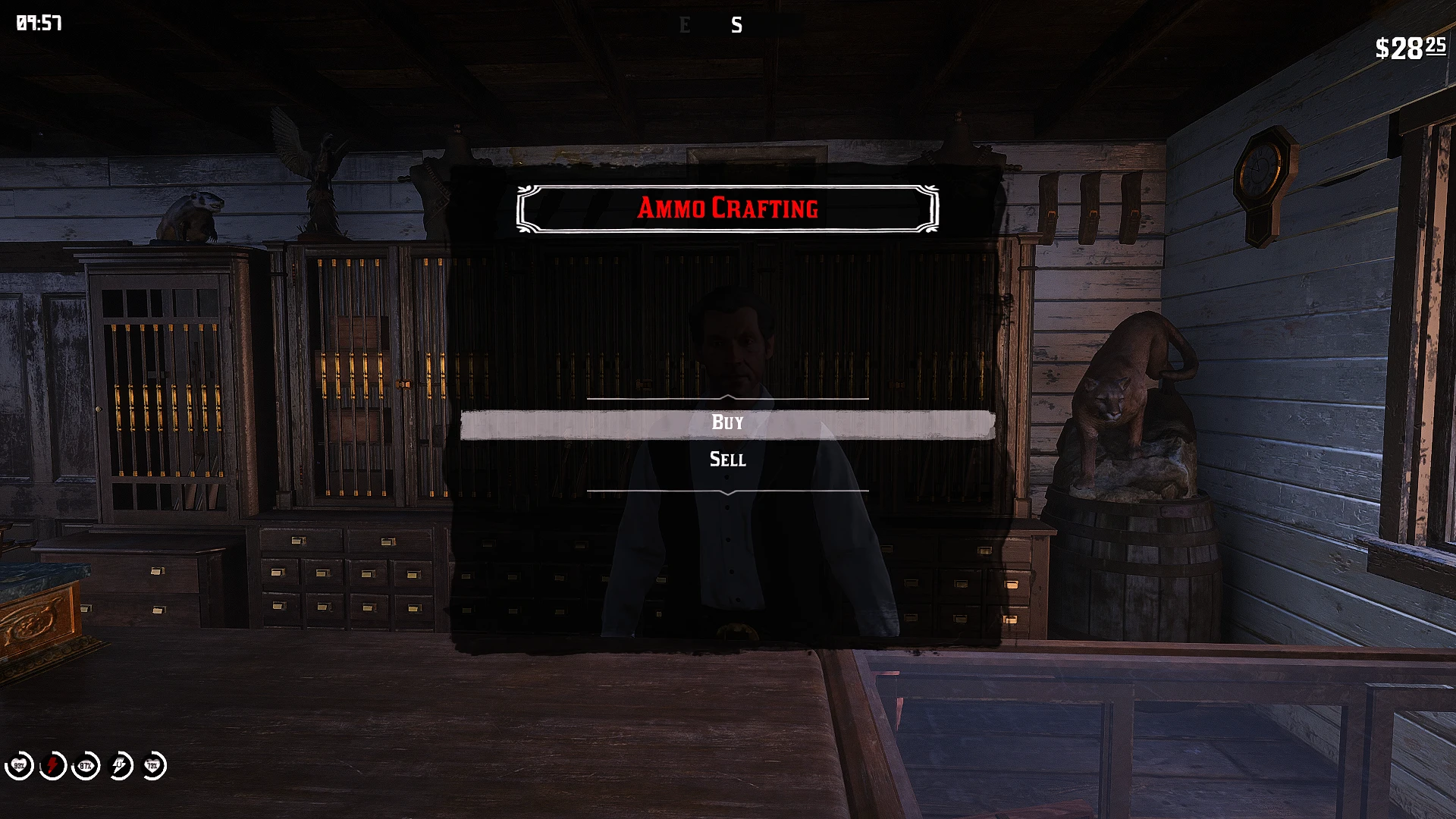
This mod adds a new in-game crafting menu that can be opened at any time, allowing you to craft Provisions, Tonics, Ammunition, Hunting Supplies, and Horse Care items without needing to visit a campfire or grill.
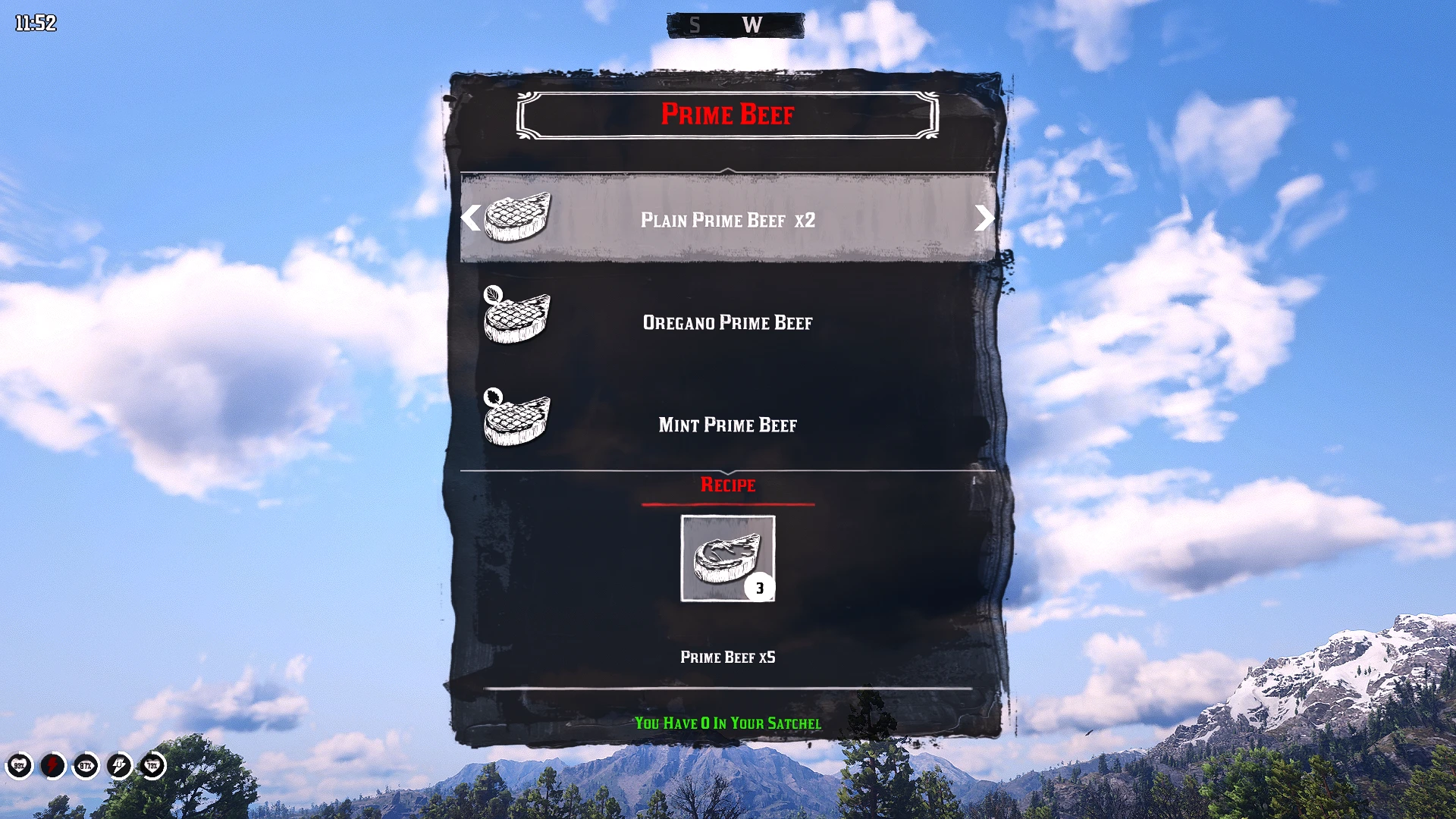
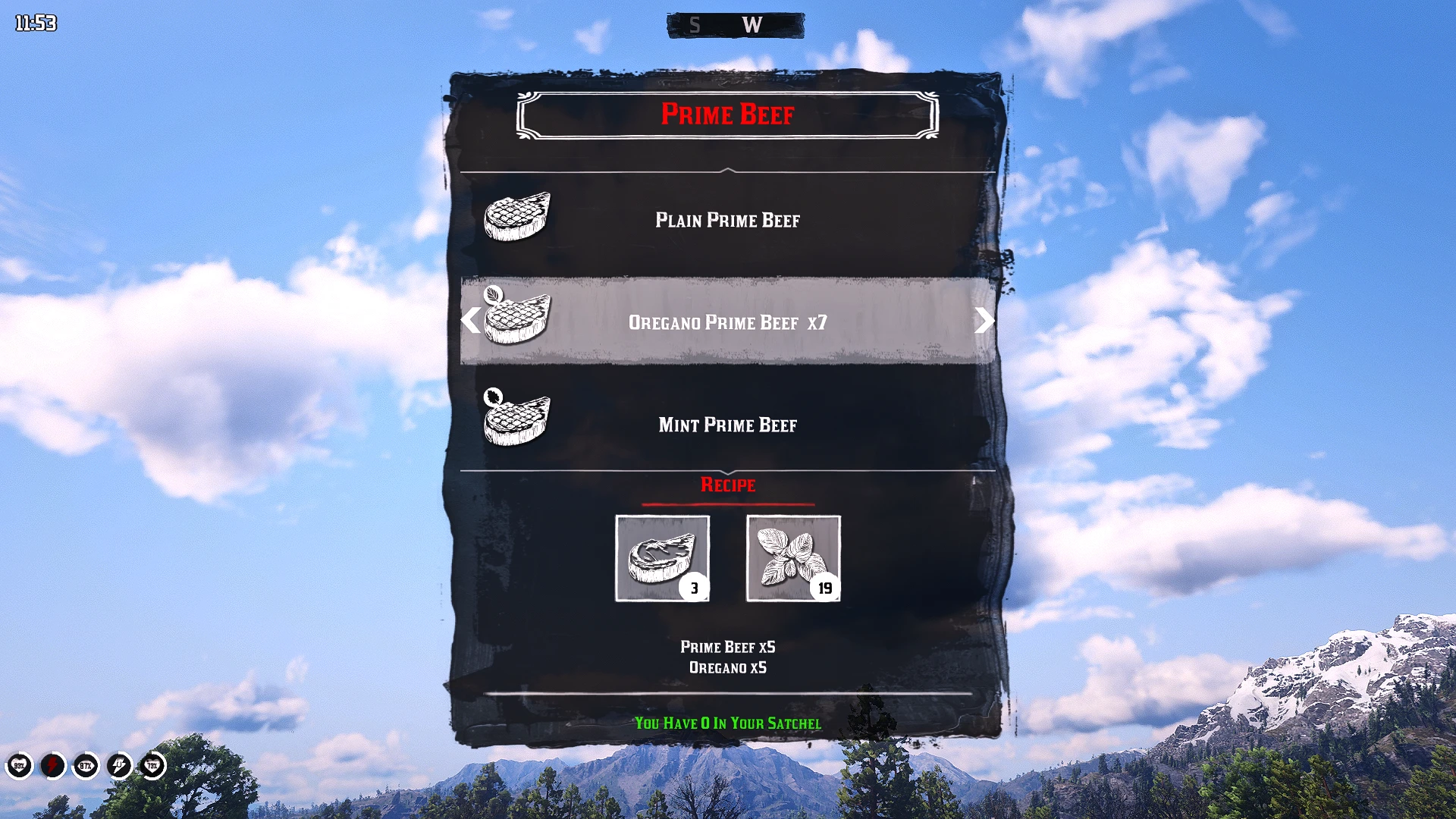
Each recipe clearly displays the materials required, how many of those materials you currently have in your satchel, and how many items will be produced. Missing materials are highlighted in red, and the menu will automatically prevent the recipe from being crafted until all requirements have been met.
Every individual recipe is fully customizable through the INI file. You can assign up to four different material requirements to each item, adjust how many of each material are consumed, and control the final crafting Yield. The system supports nearly every item recognized by the mod, allowing you to use ammunition, herbs, food, animal parts, valuables, and many other resources as crafting ingredients. Each output can also support up to five different recipe variations, giving you the option to create alternate ingredient combinations or bulk recipes with higher costs and larger Yields.
The mod also introduces a complete GUNPOWDER and SHELL CASING system. These resources can be purchased from or sold to any gunsmith in the game, while unwanted ammunition can be dismantled and broken back down into its core components. GUNPOWDER and SHELL CASINGS can then be used to craft regular ammunition or added as requirements to any other supported recipe, giving you full control over how ammunition and resources are managed throughout the game.
[HOW TO INSTALL]
*Ensure you have ScriptHook V2 installed properly (This works with Alexander Blades Scripthook as well)*
Download the current version of USJO.
Open the ZIP file and drag UCMO.ASI , UCMO.INI, and Ultimate Sounds into your main RDR2 directory where you installed ScriptHook.
When you first set up a camp you should get a .dat generated called UCMO_Ammo.dat
If you do not see the .dat, you must ensure that you set BOTH RDR2.EXE, and playRDR2.exe to be run as a administrator, this allows my mod to create and write its .dat files, which store your campsites position, camp chest contents, and camp supplies. This mod will not function properly without those.
[TRANSLATION / NAME CHANGING]
This mod comes already fully translated into every available game language that the base game supports. Due to the scope of the ini file certain words or phrases may not fit the proper localization. You can freely adjust any word in the ini to fix any inconsistency you find.
You can also adjust the name of the recipe if you want to make unique recipes, and get creative with your names! I left a example of this for the Mint Tender Pork with it being called Pork N’ Beans, and requiring a can of baked beans instead of mint to craft. This is also explained more in the detailed crafting guide.
[HOW TO ACTIVATE]
HOTKEYS :
ActivationPromptKey
Keyboard : E (Configurable in the ini)
Controller : RB Button (R1) (Configurable in the ini)
ActivationPromptKeyTwo
Keyboard : H (Configurable in the ini)
Controller : Down-Dpad (Configurable in the ini)
MenuAcceptPromptKey
Keyboard : Enter (Configurable in the ini)
Controller : A Button (X) (Configurable in the ini)
MenuBackPromptKey
Keyboard : Backspace (Configurable in the ini)
Controller : B Button (Circle) (Configurable in the ini)
MenuNavigationUpPromptKey
Keyboard : W (Configurable in the ini)
Controller : UP (Configurable in the ini)
MenuNavigationDownPromptKey
Keyboard : S (Configurable in the ini)
Controller : Down (Configurable in the ini)
MenuNavigationLeftPromptKey
Keyboard : A (Configurable in the ini)
Controller : Left (Configurable in the ini)
MenuNavigationRightPromptKey
Keyboard : D (Configurable in the ini)
Controller : Right (Configurable in the ini)
Both of these keys need to pressed at the same time, you can hold one button, and then press the other. Upon activation you will see the new crafting menu pop up.
The player needs to press the MenuAcceptPromptKey and they will be able to progress through the menu, while pressing the MenuBackPromptKey will bring them back to the previous menu. This will also close the menu when you are on the main page, and by holding it you can also close the menu at any page.
[CRAFTING GUIDE]
Every supported recipe can use up to four different materials through its Requirement1 to Requirement4 entries. Requirement1 must contain a valid material, while the remaining lines can be filled with additional ingredients or left blank when they are not needed.
A material hash entered by itself requires one of that item. To require more, add a comma followed by the desired amount, such as AMMO_PISTOL, 5. Do not place the same material on multiple requirement lines; simply increase the quantity on its existing line.
The Yield setting controls how many finished items the player receives from one crafting action. Material costs and Yield are completely independent, so you can create single-item recipes, bulk recipes, or recipes that consume several materials but produce multiple finished items.
Each output can support the base recipe and up to four alternate recipes, giving the player as many as five different ways to craft the same item. Alternate recipes are numbered continuously with 2, 3, 4, and 5, and players can use LEFT and RIGHT in the menu to cycle through the available ingredient combinations.
Recipe materials must use compatible item hashes from the Resources section of the INI. These include supported ammunition, herbs, food, animal parts, tonics, hunting supplies, horse-care items, valuables, and other recognized resources, allowing the menu to display the correct name, picture, required quantity, and amount currently owned.
Only change the materials, quantities, and Yield values on the right side of each recipe entry. The functional keys on the left must remain unchanged, because renaming an Item, Type, Requirement, Craft, or Yield token will prevent the mod from recognizing that recipe.
*BELOW IS A MORE DETAILED FULL GUIDE THAT EXPLAINS THINGS WAY MORE THROUGHLY*
INTRO
You can decide which materials a recipe requires, how many of each material the player must carry, how many finished items are produced, and whether the same item can be crafted through several different ingredient combinations.
This system can be used for simple balancing changes or for rebuilding the game’s crafting economy around an entirely different style of play. You can make powerful ammunition require rare animal parts, increase the number of herbs needed for stronger tonics, create bulk recipes that produce several items at once, or make regular ammunition depend on GUNPOWDER and SHELL CASINGS. You can also give the player several different ways to craft the same item, allowing common ingredients, rare ingredients, or alternative materials to be used depending on what the player currently has available.
All of this is handled through the existing recipes included in the INI. You do not need to rename menu items or modify the mod’s code when changing the material cost or output amount of an existing recipe.
RECIPE MATERIALS AND REQUIREMENTS
Every recipe can require up to four different materials. These are controlled by the Requirement1, Requirement2, Requirement3, and Requirement4 entries belonging to that recipe.
Requirement1 should always contain at least one valid material. The remaining three lines can be used for additional ingredients or left blank when they are not needed.
For example:
PistolCraftHighVelocityRequirement1 = AMMO_PISTOL, 3
PistolCraftHighVelocityRequirement2 = PROVISION_BUCK_ANTLERS, 2
PistolCraftHighVelocityRequirement3 =
PistolCraftHighVelocityRequirement4 =
PistolCraftHighVelocityYield = 1
This recipe requires three regular pistol rounds and two buck antlers. Requirement3 and Requirement4 are blank, so they are ignored by the mod and will not be displayed in the recipe information shown to the player.
Every material must use one of the supported hashes listed in the Resources section of the INI. This section contains compatible ammunition, herbs, animal parts, provisions, cooked food, tonics, horse-care supplies, hunting items, valuables, and other resources that the crafting menu can correctly recognize.
Examples of supported hashes include AMMO_PISTOL, AMMO_GUNPOWDER, AMMO_SHELL_CASING, PROVISION_ANIMAL_FAT, PROVISION_BUCK_ANTLERS, CONSUMABLE_HERB_GINSENG, and CONSUMABLE_HERB_WILD_MINT.
Using a supported hash allows the crafting menu to show the correct item name, image, required quantity, and amount currently carried by the player.
CHANGING THE REQUIRED QUANTITY
When a material hash is entered without a number, the required amount defaults to one.
PistolCraftHighVelocityRequirement1 = AMMO_PISTOL
This means that the recipe requires one regular pistol round.
To require more than one, place a comma after the material hash and enter the desired amount.
PistolCraftHighVelocityRequirement1 = AMMO_PISTOL, 5
This changes the requirement to five regular pistol rounds.
Each material can have its own quantity. A recipe could therefore require several different resources in different amounts:
PistolCraftHighVelocityRequirement1 = AMMO_PISTOL, 5
PistolCraftHighVelocityRequirement2 = PROVISION_BUCK_ANTLERS, 2
PistolCraftHighVelocityRequirement3 = AMMO_GUNPOWDER, 3
PistolCraftHighVelocityRequirement4 = AMMO_SHELL_CASING, 1
Every listed cost is charged when the player crafts the recipe.
The same material should not be repeated on multiple requirement lines. When you want the recipe to consume more of an item, increase the number beside its existing hash instead.
For example, do not place AMMO_PISTOL, 2 on Requirement1 and AMMO_PISTOL, 3 on Requirement2. Use AMMO_PISTOL, 5 on a single requirement line and leave the other line available for a different material.
Any requirement line left blank is treated as unused. It will not consume anything and will not appear in the recipe footer. Because of this, a recipe can use anywhere from one to four materials without any additional settings.
CONTROLLING HOW MANY ITEMS ARE PRODUCED
Every recipe also contains a Yield entry. The Yield determines how many finished items the player receives each time the recipe is crafted.
PistolCraftHighVelocityYield = 1
This gives the player one high-velocity pistol round.
PistolCraftHighVelocityYield = 5
This gives the player five high-velocity pistol rounds.
Material costs and Yield are controlled independently. Increasing the Yield does not automatically increase the ingredients required by the recipe. You decide exactly how much the player spends and how much the player receives.
For example:
PistolCraftHighVelocityRequirement1 = AMMO_PISTOL, 1
PistolCraftHighVelocityRequirement2 = PROVISION_BUCK_ANTLERS, 3
PistolCraftHighVelocityRequirement3 =
PistolCraftHighVelocityRequirement4 =
PistolCraftHighVelocityYield = 2
This recipe consumes one regular pistol round and three buck antlers, then gives the player two high-velocity pistol rounds.
When the Yield is greater than one, the crafting menu displays the output quantity beside the selected recipe. A Yield of five, for example, will display an x5 indicator so the player can clearly see how many items will be produced.
Yield should always be entered as a positive whole number. Values such as 1, 2, 5, or 10 are valid. Decimal values and negative numbers should not be used. If the mod cannot find a valid Yield entry, it defaults to one.
CREATING BULK CRAFTING RECIPES
Higher material requirements can be combined with a higher Yield to create bulk recipes. This allows the player to craft several items at once instead of repeatedly crafting them one at a time.
For example:
PrimeBeef2CraftPlainRequirement1 = PROVISION_PRIME_BEEF, 5
PrimeBeef2CraftPlainRequirement2 =
PrimeBeef2CraftPlainRequirement3 =
PrimeBeef2CraftPlainRequirement4 =
PrimeBeef2CraftPlainYield = 5
This recipe consumes five pieces of raw prime beef andproduces five cooked pieces through a single crafting action.
The same system can be used for regular ammunition:
PistolCraftRegularRequirement1 = AMMO_GUNPOWDER, 10
PistolCraftRegularRequirement2 = AMMO_SHELL_CASING, 10
PistolCraftRegularRequirement3 =
PistolCraftRegularRequirement4 =
PistolCraftRegularYield = 10
This recipe consumes ten units of GUNPOWDER and ten SHELL CASINGS to produce ten regular pistol rounds.
Because the costs and Yield are independent, bulk recipes can be balanced however you prefer. They can provide an equal exchange, offer a small discount for crafting in larger quantities, or charge additional materials in exchange for convenience.
ADDING ALTERNATE RECIPES
A single output can support up to five different recipes. This includes the original base recipe and four optional alternate recipes.
Alternate recipes allow the same finished item to be crafted with different materials. This is useful for making similar ingredients interchangeable, creating common and rare versions of a recipe, adding bulk alternatives, or giving the player another option when a particular resource is unavailable.
For example, a Fire Molotov can use rum in its base recipe:
MolotovCraftFireRequirement1 = CONSUMABLE_RUM
MolotovCraftFireRequirement2 = PROVISION_ANIMAL_FAT
MolotovCraftFireRequirement3 =
MolotovCraftFireRequirement4 =
MolotovCraftFireYield = 1
An alternate recipe can use whiskey:
Molotov2CraftFireRequirement1 = CONSUMABLE_WHISKEY
Molotov2CraftFireRequirement2 = PROVISION_ANIMAL_FAT
Molotov2CraftFireRequirement3 =
Molotov2CraftFireRequirement4 =
Molotov2CraftFireYield = 1
A third recipe can use brandy:
Molotov3CraftFireRequirement1 = CONSUMABLE_BRANDY
Molotov3CraftFireRequirement2 = PROVISION_ANIMAL_FAT
Molotov3CraftFireRequirement3 =
Molotov3CraftFireRequirement4 =
Molotov3CraftFireYield = 1
A fourth recipe can use gin:
Molotov4CraftFireRequirement1 = CONSUMABLE_GIN
Molotov4CraftFireRequirement2 = PROVISION_ANIMAL_FAT
Molotov4CraftFireRequirement3 =
Molotov4CraftFireRequirement4 =
Molotov4CraftFireYield = 1
All four recipes produce the same Fire Molotov. The only difference is the combination of materials required.
When an output has more than one available recipe, the player can use LEFT and RIGHT while that output is selected to cycle through each ingredient option.
ALTERNATE RECIPE NUMBERING
The original recipe does not contain a number. Alternate recipes add the number 2, 3, 4, or 5 directly after the Item portion of the recipe key.
The base recipe uses:
MolotovCraftFireRequirement1
Recipe 2 uses:
Molotov2CraftFireRequirement1
Recipe 3 uses:
Molotov3CraftFireRequirement1
Recipe 4 uses:
Molotov4CraftFireRequirement1
Recipe 5 uses:
Molotov5CraftFireRequirement1
Alternate recipes must be numbered continuously. Recipe 3 will only be detected when recipe 2 exists. Recipe 4 requires recipes 2 and 3, and recipe 5 requires recipes 2, 3, and 4.
You cannot skip directly from the base recipe to recipe 3.
Incorrect:
MolotovCraftFireRequirement1 = CONSUMABLE_RUM
Molotov3CraftFireRequirement1 = CONSUMABLE_BRANDY
Correct:
MolotovCraftFireRequirement1 = CONSUMABLE_RUM
Molotov2CraftFireRequirement1 = CONSUMABLE_WHISKEY
Molotov3CraftFireRequirement1 = CONSUMABLE_BRANDY
Requirement1 also determines whether an alternate recipe is active. If Requirement1 is blank, that alternate recipe is disabled and will not appear to the player.
UNDERSTANDING RECIPE KEY NAMES
Every recipe key follows a fixed structure:
{Item}[RecipeNumber]Craft{Type}Requirement1
{Item}[RecipeNumber]Craft{Type}Requirement2
{Item}[RecipeNumber]Craft{Type}Requirement3
{Item}[RecipeNumber]Craft{Type}Requirement4
{Item}[RecipeNumber]Craft{Type}Yield
Consider the following key:
PistolCraftHighVelocityRequirement1
Pistol is the Item, Craft is a fixed part of the key, HighVelocity is the recipe Type, and Requirement1 identifies the first material requirement. Because there is no number after Pistol, this is the base recipe.
Now consider:
PrimeBeef2CraftOreganoYield
PrimeBeef is the Item, 2 identifies alternate recipe 2, Craft is the fixed recipe token, Oregano is the Type, and Yield controls how many finished items are received.
These names are functional identifiers used by the mod. Their spelling and structure must remain unchanged. Renaming Pistol, PrimeBeef, Craft, HighVelocity, Oregano, Requirement1, or Yield will prevent the mod from locating the expected recipe.
EDITING AN EXISTING RECIPE
To edit an existing recipe, first locate the item inside the appropriate recipe section of the INI. Every recipe will have four Requirement lines followed by a Yield line.
Change only the materials and quantities on the right side of the equals sign. Leave unused requirements blank, set the desired Yield, and do not rename anything on the left side.
For example, the original Fire Arrow recipe may look like this:
ArrowCraftFireRequirement1 = AMMO_ARROW
ArrowCraftFireRequirement2 = PROVISION_ANIMAL_FAT
ArrowCraftFireRequirement3 = PROVISION_BIRD_FEATHER_FLIGHT
ArrowCraftFireRequirement4 =
ArrowCraftFireYield = 1
You could change it to:
ArrowCraftFireRequirement1 = AMMO_ARROW, 2
ArrowCraftFireRequirement2 = PROVISION_ANIMAL_FAT, 2
ArrowCraftFireRequirement3 = PROVISION_BIRD_FEATHER_FLIGHT, 1
ArrowCraftFireRequirement4 = AMMO_GUNPOWDER, 1
ArrowCraftFireYield = 2
The output remains Fire Arrows because the recipe key itself was not renamed. Only the required materials and the produced quantity were changed.
CREATING AN ALTERNATE VERSION OF AN EXISTING RECIPE
To create an alternate recipe, copy the complete base recipe and add the number 2 after the Item portion of every copied key. Requirement1 must contain a valid material, and the other requirements and Yield can then be configured normally.
For example, a Special Health Cure may use milkweed in its original recipe:
HealthCureCraftSpecialRequirement1 = CONSUMABLE_HERB_GINSENG, 2
HealthCureCraftSpecialRequirement2 = CONSUMABLE_HERB_YARROW, 2
HealthCureCraftSpecialRequirement3 = CONSUMABLE_HERB_MILKWEED, 2
HealthCureCraftSpecialRequirement4 =
HealthCureCraftSpecialYield = 1
An alternate recipe can use English mace instead:
HealthCure2CraftSpecialRequirement1 = CONSUMABLE_HERB_GINSENG, 2
HealthCure2CraftSpecialRequirement2 = CONSUMABLE_HERB_YARROW, 2
HealthCure2CraftSpecialRequirement3 = CONSUMABLE_HERB_ENGLISH_MACE, 2
HealthCure2CraftSpecialRequirement4 =
HealthCure2CraftSpecialYield = 1
Both versions produce the same Special Health Cure, but the player can choose between two different ingredient combinations.
WHAT THE INI CANNOT CREATE
The INI can customize existing recipes, but it cannot create a completely new output that the mod does not already support.
Changing PistolCraftHighVelocityRequirement1 into PistolCraftSuperAmmoRequirement1 will not create a new Super Ammo item. The mod does not recognize SuperAmmo as an existing recipe type and will ignore the renamed entry.
Existing recipes can be customized through their material costs, quantities, Yield, alternate recipes, and displayed names. However, a completely new output, category, image, or recipe type must first be added to the mod’s code before it can be configured through the INI.
CHANGING DISPLAYED NAMES
The functional recipe keys do not control the names shown inside the crafting menu. Player-facing names are controlled through the [Translation] section near the bottom of the INI.
Each entry contains a fixed lookup name on the left and the displayed text on the right.
For example:
Mint Tender Pork = Mint Tender Pork
This can be changed to:
Mint Tender Pork = Pork N’ Beans
The menu will then display Pork N’ Beans, but the functional recipe key will remain:
TenderPorkCraftMintRequirement1
Changing the text on the right side only changes the name shown to the player. It does not change the output, recipe type, ingredients, or underlying recipe key.
IMPORTANT INFORMATION
When customizing recipes, always keep the keys on the left side unchanged and edit only the values on the right. Use supported hashes from the Resources section, keep at least one valid material on Requirement1, and use no more than four different materials per recipe.
Do not repeat the same material on multiple requirement lines. Increase its quantity after the comma instead. Leave unused lines blank, use positive whole numbers for Yield, and keep alternate recipe numbers continuous.
Displayed names should be changed only through the [Translation] section. Functional keys, material hashes, input names, and technical values should never be translated or renamed.
With these tools, every supported recipe can be balanced around your preferred style of play. Recipes can remain close to the original game, become more demanding and resource-focused, support bulk crafting, provide several alternate ingredient combinations, or become part of a completely redesigned crafting economy.
[GUNPOWDER AND SHELL CASING]
This mod also introduces a complete ammunition resource system built around GUNPOWDER and SHELL CASINGS. These materials can be purchased from or sold to any gunsmith in the game, giving you a new way to manage both your ammunition supplies and your money.
You can also dismantle ammunition you no longer need, breaking it back down into GUNPOWDER and SHELL CASINGS instead of letting it go to waste. Those recovered materials can then be reused to craft regular ammunition for pistols, revolvers, repeaters, rifles, shotguns, and other supported weapon types.
The system is fully configurable, so GUNPOWDER and SHELL CASINGS are not limited to regular ammunition. You can add them as required materials for any supported crafting recipe, adjust how much each recipe consumes, and control how many items the player receives. This allows you to create anything from simple ammunition costs to a much deeper crafting economy where every round can be purchased, dismantled, recycled, and crafted into something new.
[SOUND EFFECTS]
This mod uses the same exact base game sound effects for the menu navigation, accept, and back. You can choose to leave this option on or off.
[BUGS]
So far no bugs have been found through my testing, please let me know if you find anything when using this mod.
[Q & A]
Q: Is this Mod compatible with XYZ?
A: I have tested and used this mod during my own playthrough which is heavily modded, and includes majority of the most popular mods. With that said it should be compatible with MOST MODS, but this is not a guarantee that it will work with ALL MODS. So far I have found zero compatibility issues.
Q: Why does it not show any picture for the item and the name isn’t displaying properly
A: More then likely you have the name of the hash for the item wrong in the ini, the ini keys have to be typed exactly as they are displayed in the resource section of the ini, if its misspelled or you use something not within that section then it WILL NOT DISPLAY in the menu.
Q: Can you add more items that are not in the normal crafting list?
A: Essentially yes, I can add any item to be crafted, I would just need to know what specifically you want for a new section.
Q: What other mods would you recommend with this one?
Credits:
alejahH
Downloads
| Name | Format | Size |
|---|---|---|
| UCMO1.0.zip | ZIP | 567.32 KB |
To start download click the filename. To open archive files use one of these programs: WinRAR, 7-Zip, WinZip. Some mod archives may need to be extracted before the mods will work.