
The rapid attribute progression in RDR2 has always bothered me, especially with my slow-paced playstyle. By Chapter 3, I was usually maxed out on Health, Stamina, and Dead Eye, making special elixirs practically useless.
Not anymore.
After several days of digging through the game’s logic, ProgressivePlayerXP was born.
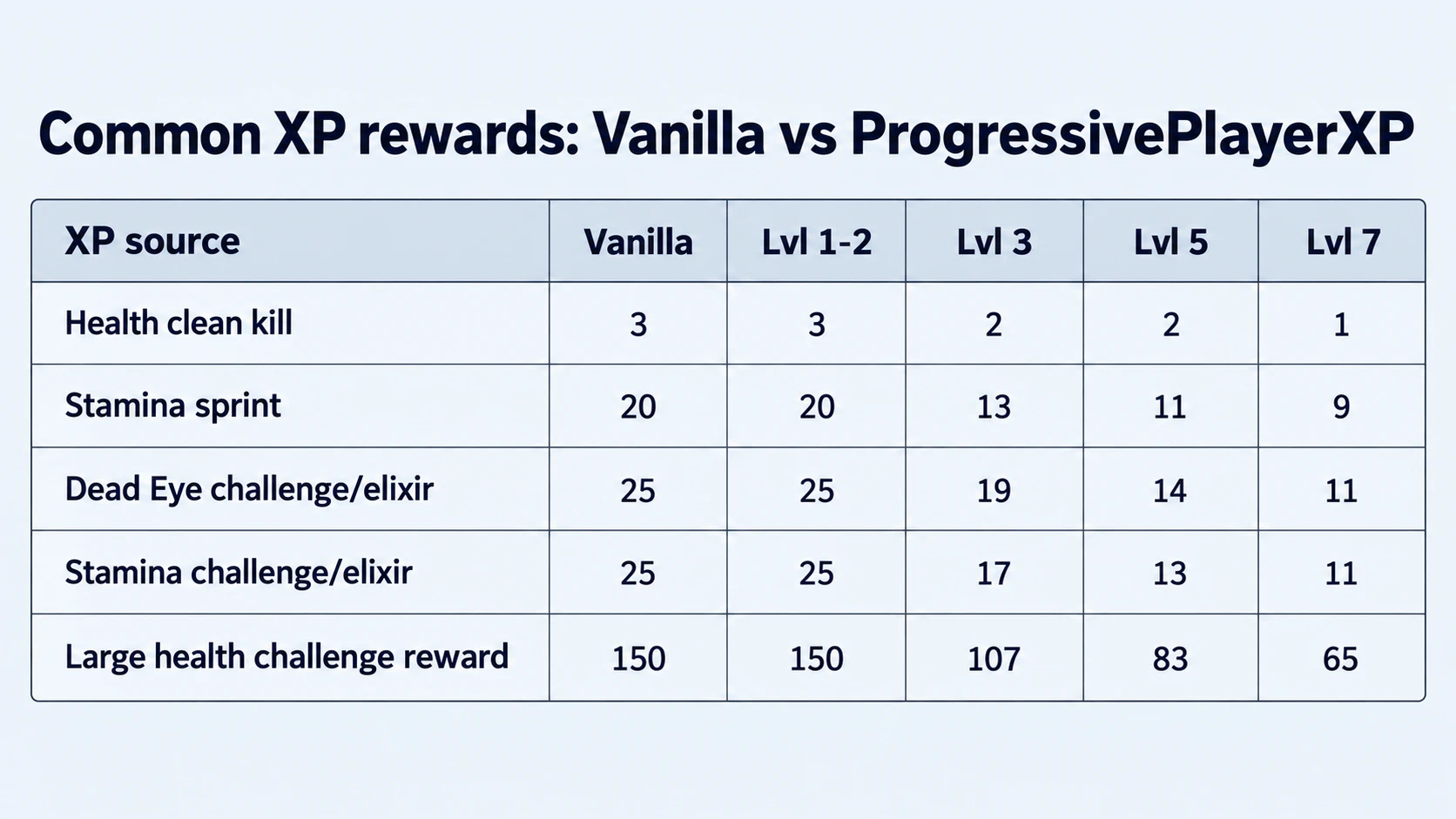
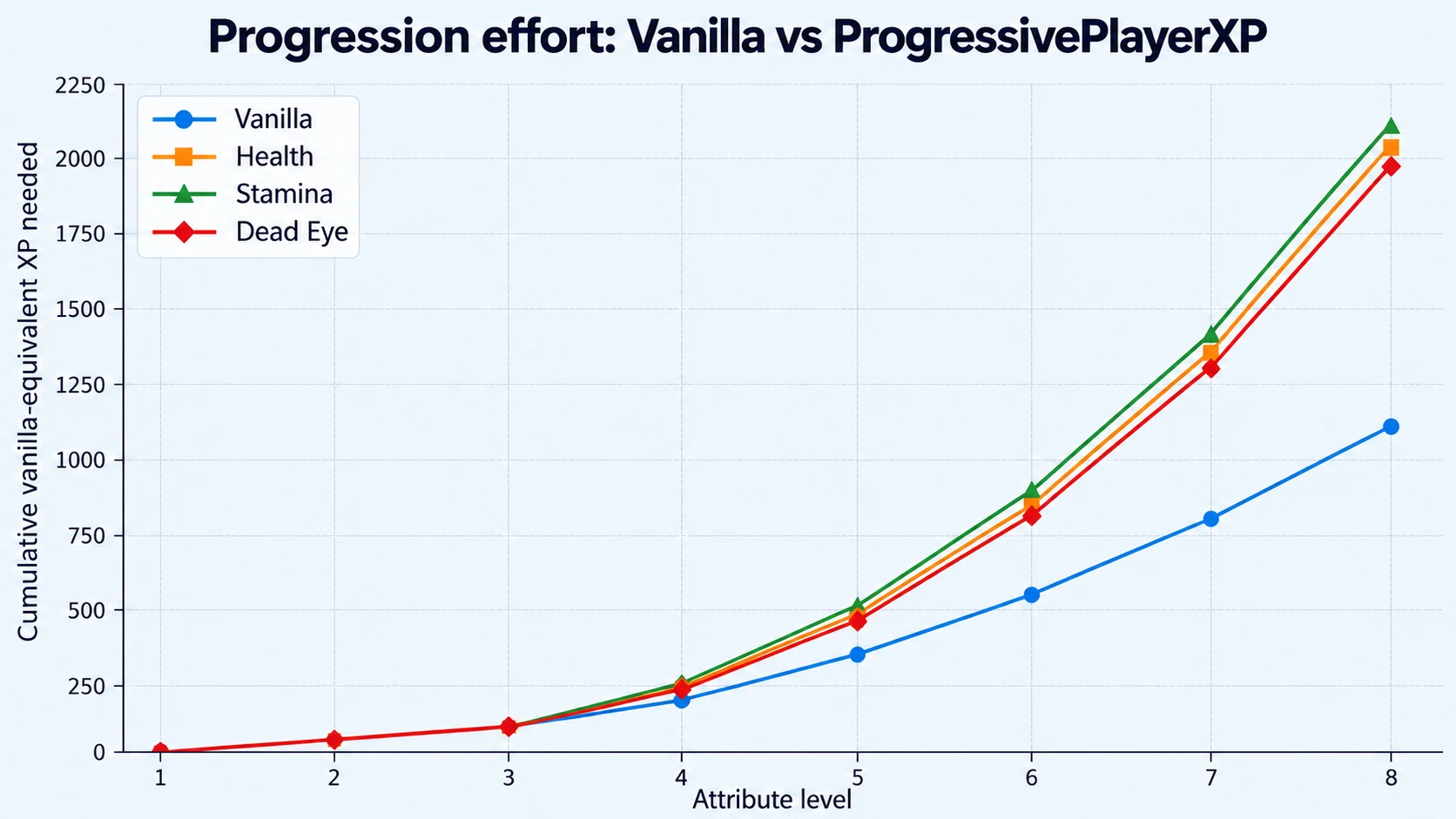
The mod progressively reduces XP gains as Arthur / John develops his attributes. Levels 1–2 remain unchanged, while later levels become increasingly challenging.
Regular activities, challenges, and special elixirs are all affected, giving you a reason to keep developing Arthur / John throughout the story.
FEATURES AT A GLANCE
Progressive XP: XP gains decrease as Health, Stamina, and Dead Eye increase.
Normal early progression: Levels 1–2 remain unchanged.
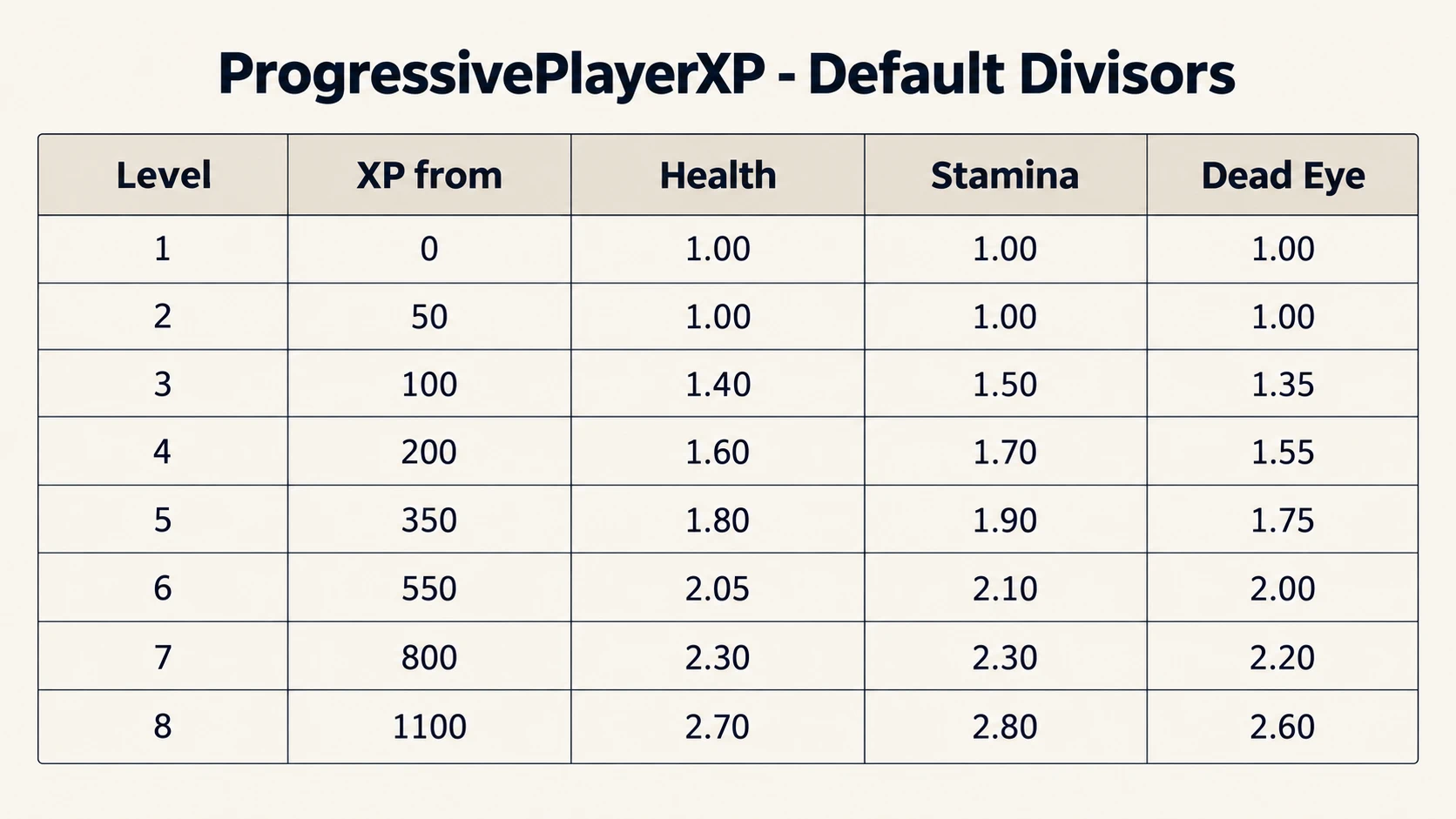
Individual balancing: Separate XP divisors for each attribute and level.
Fully configurable: Adjust all divisors through the INI file.
Individual controls: Enable or disable Health, Stamina, and Dead Eye separately.
Optional logging: Disabled by default.
Existing progress preserved: Your current XP and attribute levels are not reset.
In short:
Vanilla decides when and for what XP is awarded.
ProgressivePlayerXP only changes how much of that XP is actually received.
HOW IT WORKS
ProgressivePlayerXP reduces incoming attribute XP using level-dependent divisors.
The higher the attribute level, the less XP Arthur / John receives.
Example:
A reward of 20 Vanilla XP becomes approximately 10 XP with a divisor of 2.00.
The default configuration is balanced for slower progression throughout the story. All divisors can be adjusted individually in the INI file.
Please note: Small XP rewards may result in 0 XP at higher levels due to the game’s integer rounding. This is an intended consequence of XP reduction.
INSTALLATION & CONFIGURATION
Extract the ASI and INI files into your RDR2 game directory, next to RDR2.exe.
Start the game.
To customize the progression, open ProgressivePlayerXP.ini in a text editor.
You can change the divisors for each level, disable individual attributes, or disable the mod entirely.
Minimum divisor: 1.00. Values below 1.00 are automatically treated as 1.00.
INI changes take effect after restarting the game.
UNINSTALLATION
ProgressivePlayerXP changes the game’s persistent XP source bonus values while it is active.
Because these values are stored in the save file, do not simply remove the ASI while reduced XP values are still active.
To safely restore the game’s normal XP behavior before uninstalling:
Open ProgressivePlayerXP.ini
Set all Health, Stamina and Dead Eye divisors to 1.00.
Start the game and load the save you want to keep.
Wait until ProgressivePlayerXP has activated.
Save the game to a new save slot.
Exit the game.
You can now remove ProgressivePlayerXP.asi and the INI file.
With all divisors set to 1.00, ProgressivePlayerXP restores the correct vanilla XP source bonuses for that save, including supported XP bonuses from owned trinkets and the Legend of the East outfit.
REQUIREMENTS
Red Dead Redemption 2 (PC, Story Mode)
ScriptHookRDR2
ASI Loader
COMPATIBILITY
ProgressivePlayerXP should not be used together with other mods that modify Health, Stamina or Dead Eye XP, attribute progression, level thresholds, or related player-stat globals.
This includes XP/progression features from larger gameplay overhauls.
Using multiple progression mods at the same time may cause conflicting XP calculations or trigger ProgressivePlayerXP’s safety checks.
Mods that do not modify attribute XP or progression should generally be compatible.
DISCLAIMER
ProgressivePlayerXP is balanced and tested using the default configuration.
You are free to customize the XP divisors, but modified values are used at your own risk.
Credits:
AlCord
Downloads
| Name | Format | Size |
|---|---|---|
| ProgressivePlayerXP-1.03.zip | ZIP | 22.93 KB |
To start download click the filename. To open archive files use one of these programs: WinRAR, 7-Zip, WinZip. Some mod archives may need to be extracted before the mods will work.