Take off any piece of your outfit, roll up your sleeves, open your collar or coat, tuck your pants into your boots and pick your riding posture, from a wheel that looks like the weapon wheel. On foot, horseback or wagon.
The problem
In vanilla RDR2, you can only change what your character wears at a wardrobe, in a store, or one piece at a time from the item wheel for hats and bandanas. There’s no way to simply take your coat off in the heat, roll up your sleeves, hang up your gun belt at camp, or put your hat back on once you’re done, wherever you are.
What this mod does
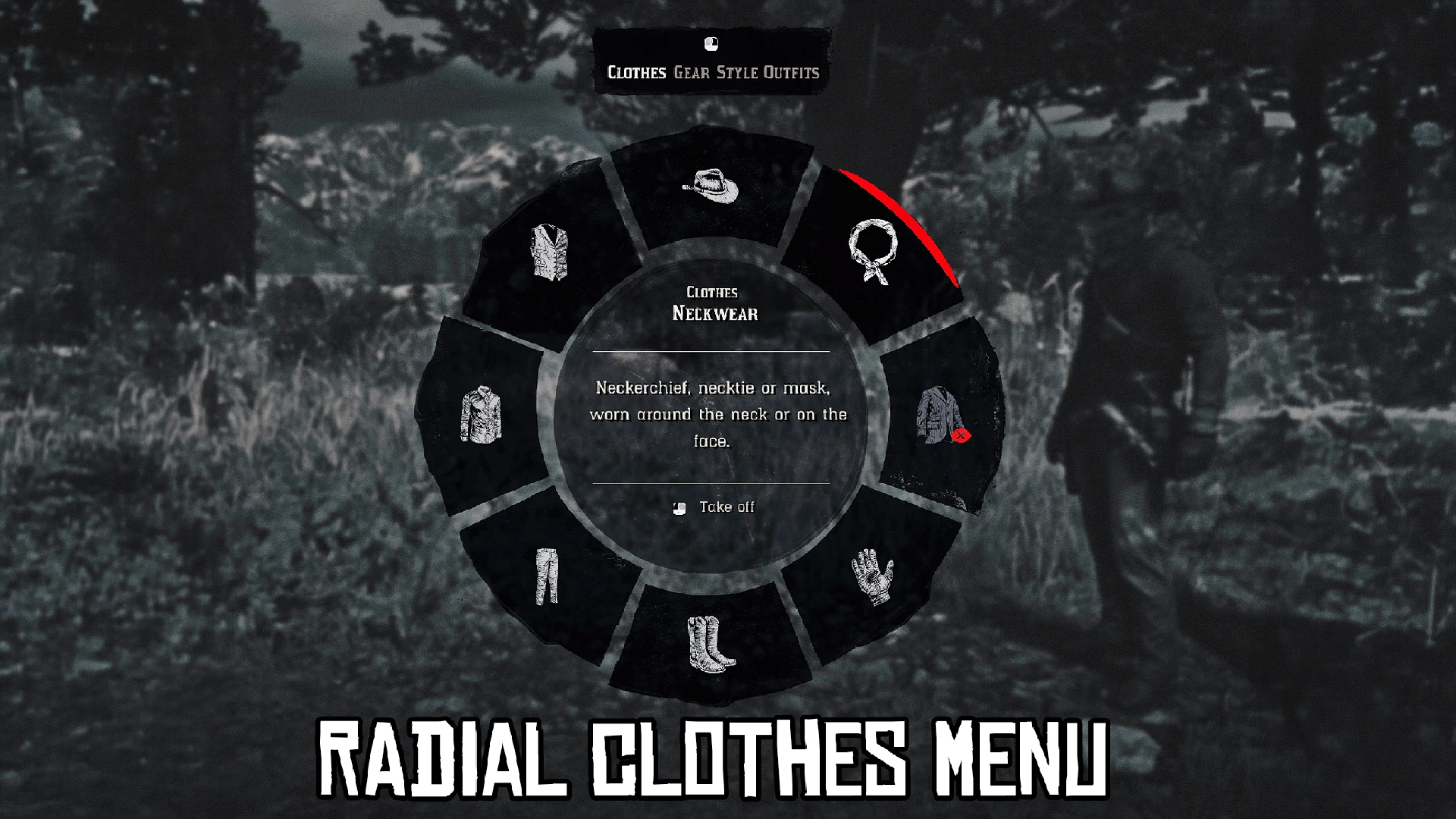
Hold T (or press it once, with KeyMode=TOGGLE) and a radial wheel opens that looks and feels like the game’s own weapon wheel: same slots, same size, the same grey filter, slow motion, sounds and small camera zoom. Aim at a piece of clothing and click: your character takes it off with a vanilla animation. Click it again and he puts it back on.
It works on foot, on horseback and in wagons: you keep steering your horse or wagon while the wheel is open.
Fully compatible with Catalogue Improvements: its shirts, open and cowboy vests, collar styles and undershirts all work with the wheel.
Five tabs, fixed places
Like the weapon wheel, every piece always sits in the same place, laid out like the body: the head at the top, the feet at the bottom, the torso on the sides. After a couple of uses you won’t even need to look.
- Clothes – hat, neckwear, coat, gloves, boots, pants, shirt, vest
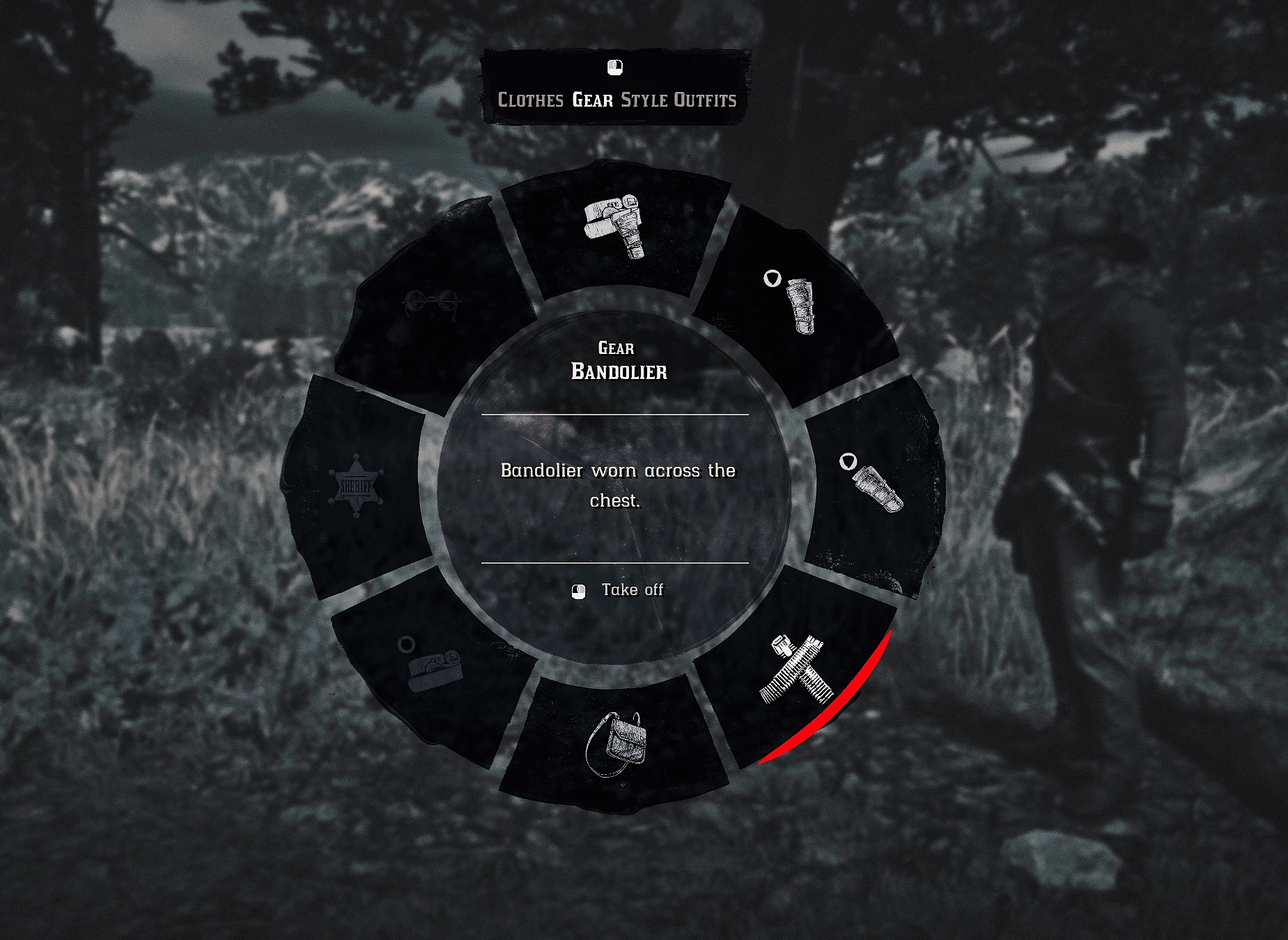
- Gear – gun belt, holster, left holster, bandolier, satchel, belt, badge, glasses
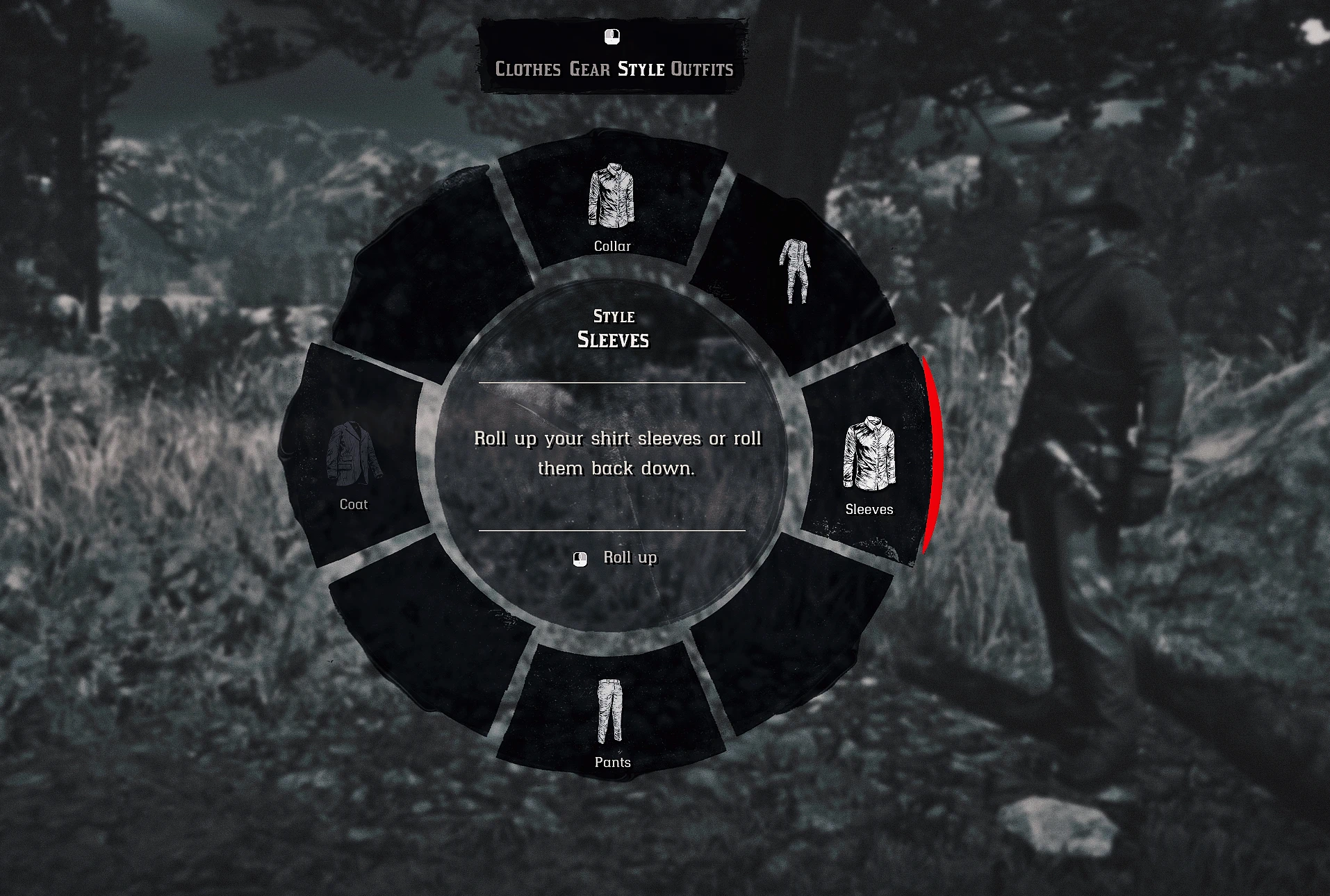
- Style – collar open or buttoned up, sleeves rolled up or down, pants tucked into the boots or worn over, coat open or closed, undershirt on or off (Catalogue Improvements)
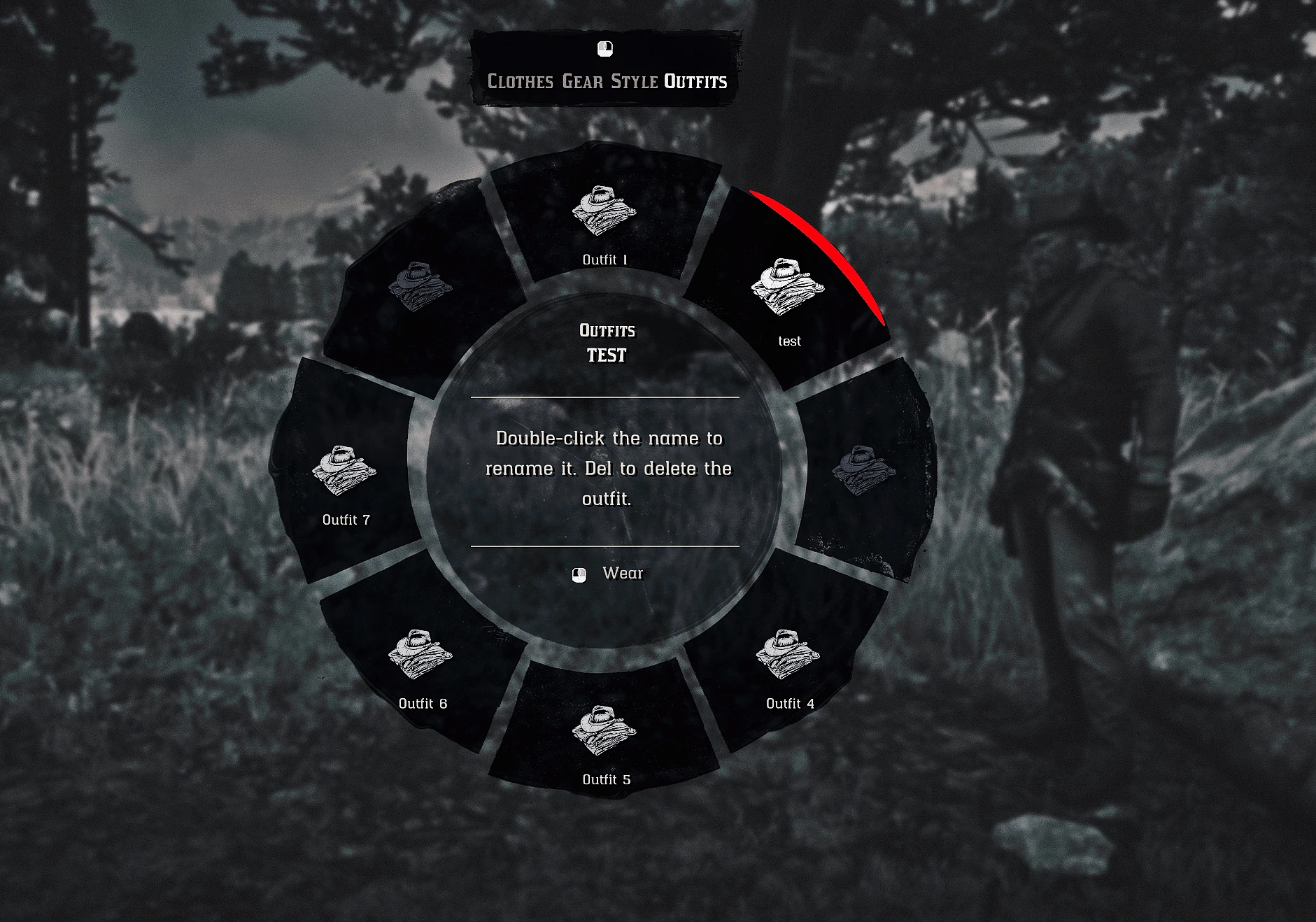
- Outfits – 8 saved outfits you can change into anywhere, each with its own satchel and bandolier
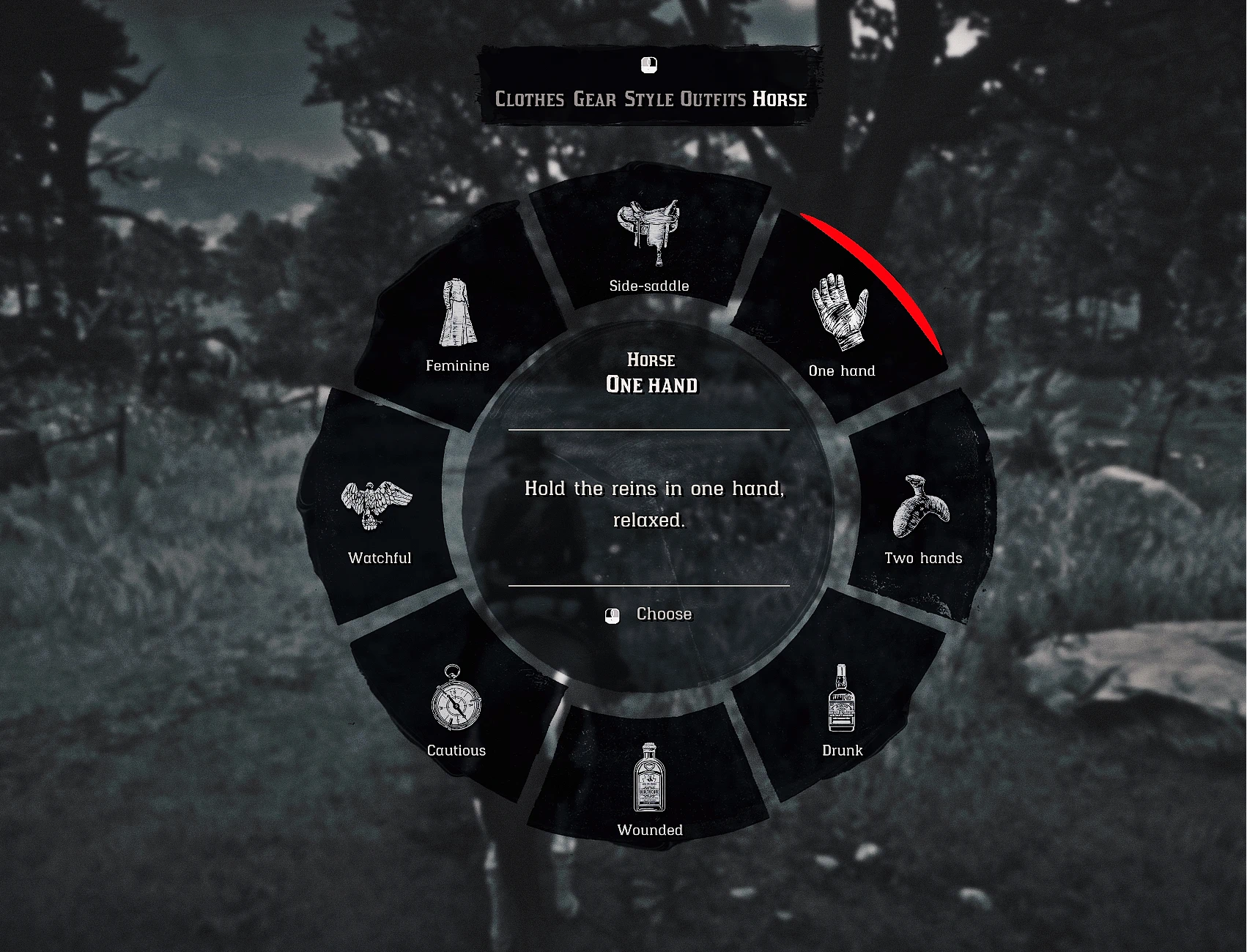
- Horse (only in the saddle) – 8 riding postures: side-saddle, one hand, two hands, drunk, wounded, cautious, watchful, feminine
Right click switches tabs. The centre of the wheel works like the weapon wheel’s: it shows the piece you’re aiming at, a short description of it and what the click will do, in your game’s language.
A piece you’re not wearing stays greyed out, and the cursor skips it. Linked pieces come off and go back together: the spurs with the boots, the mask with the neckwear… Vest and suspenders, chaps and pants come off one at a time: the outer piece first, then the one underneath, and back on in reverse.
Click the centre of the wheel to put everything back at once (in the Horse tab: back to the normal posture).
Style
Wear your clothes your way: open collar, rolled-up sleeves, pants tucked into your boots, coat open or closed. Styles are kept through reloads, cutscenes and the wardrobe, and so are the styles you set at the wardrobe (or with Catalogue Improvements).
When the game itself refuses a combination (pants can’t go into low shoes, some neckerchiefs keep the collar buttoned, many coats have no closed version), the wheel tells you instead of doing nothing.
Outfits
Dress up once, save it, and change into it anywhere. The Outfits tab has 8 slots: click an empty one to save what you’re wearing, including the pieces you took off and your style (open collar, rolled sleeves, tucked pants, open coat). Click a saved outfit and your character changes into it with the wardrobe gesture.
- Each outfit keeps its own satchel and bandolier. In the base game your bandolier is copied to every outfit: not here. Want an outfit without a bandolier? Take it off with the wheel before saving: it stays off
- Rename an outfit: double-click its name (Y on a controller), with the game’s own keyboard
- Delete it: press Del twice (X twice on a controller)
- Arthur and John each have their own 8 slots, and each playthrough keeps its own outfits
Horse
Once you’re in the saddle, a fifth tab shows up with 8 riding postures. Pick one and your character keeps it at every pace. Click it again, or the centre, to ride normally. Getting off the horse always brings the normal posture back. Don’t use it? Set HorseTab=0 in the .ini and the tab is gone.
Only from your horse (optional)
Set HorseOnly=1 in the .ini and the wheel only opens from your own horse, as if your clothes were kept in its saddlebags: walk up to it, interact with it like to brush it, and a new Clothes prompt shows up next to Brush and Pat. Riding your own horse, the key and the button open the wheel as usual.
Prefer something in between? HorseOnly=2: the wheel opens anywhere, but the Outfits tab only shows up next to your own horse (or riding it). You change outfits from its saddlebags, and take pieces off or change styles from your satchel.
Holsters
Take a holster off while its gun is in your hand and your character holsters it first. A holster you took off hides the gun it held, and without the left holster you can’t dual wield: the weapon wheel shows a single sidearm again and your second revolver goes back to your horse. Put the holster back on, then take it from your horse’s weapons. The bullets on your bandolier and gun belt leave and come back with them.
Only want the look? DualWieldNeedsHolster=0 in RadialClothes.ini: the left holster is then only a piece of clothing, and you keep dual wielding without it.
Animations
Your character plays a vanilla animation every time he takes off or puts back a piece of clothing, standing, walking or in the saddle. Prefer instant changes? Set Animations=0 in the .ini. This part is still in development: I’m looking for new animations that fit each piece better, and they will come in future updates.
What you take off stays off
The game likes to dress your character back up on its own: at the start of a mission, after a cutscene, after dying, after loading, when leaving the wardrobe. The mod keeps an eye on it: what you took off stays off, without flickering back, and the game now remembers the outfit you put together with the wheel. The wardrobe opens on what you’re wearing, and you respawn in it.
Heat and cold
The clothes you change with the wheel count for the temperature, like in vanilla: take your coat off in the snow and your character gets cold, put it back on and he warms up again. The same goes for the heat.
It never fights your own choices: whatever new piece you pick at a wardrobe, in a store or from your horse’s outfits is kept and worn, and new pieces (a coat, a mask…) show up in the wheel right away. Pick a whole new outfit and the wheel starts fresh from it.
Controller
- Double-tap D-pad Down to open the wheel. A single tap and holding it keep their normal use in the game (HUD info, minimap options). Once open, press it again (or B) to close
- The button and the way it opens (double tap, hold or single tap) can be changed in RadialClothes.ini, or turned off (keyboard only)
- Right stick to aim: the selection stays where it is when you let go, no need to hold the stick while pressing
- A to take off / put on, RB to switch tabs
- Left stick to walk (or ride) while the wheel is open
- Inverted look is followed automatically
The button icons in the wheel follow what you’re using: mouse icons on keyboard, controller icons on a pad. They are the game’s own icons: with PlayStation Icons Replacement, they show as PlayStation buttons.
Why this one
Taking clothes off in RDR2 is harder than it looks: done naively, the legs turn invisible, the arms disappear or the forearms poke through the sleeves. Radial Clothes handles every piece, tested one by one and in any order, so your character always looks right with whatever he keeps on. And it stays as close to vanilla as possible: the game’s own textures, icons, fonts, button prompts, effects and animations, a single drag-and-drop file.
Future updates
Radial Clothes is not finished: it will keep getting updates with improvements, fixes for the bugs reported by the community, new animations and more. If something doesn’t look right, tell me in the comments what you took off, in which order and what you were wearing (a screenshot helps a lot), and it will be fixed in a next version.
Features
- Take off and put back any piece of your outfit, one at a time
- Style tab: collar, sleeves, tucked pants, coat open or closed
- Outfits tab: 8 saved outfits, each with its own satchel and bandolier
- Horse tab: 8 riding postures
- Works on foot, on horseback and in wagons
- Looks and feels like the weapon wheel, with a description of every piece in the centre
- Fixed places, linked pieces handled together, “put everything back” from the centre
- Vanilla animations for each piece, standing, walking and in the saddle (or none, if you prefer)
- No invisible limbs or clipping when removing pants, shirt or gloves
- Removed pieces and styles stay through cutscenes, mission starts, deaths, reloads and the wardrobe
- Heat and cold follow what your character really wears
- Optional: open the wheel only from your own horse
- Keyboard and mouse or controller, with the matching button icons; hold the key or press it once (KeyMode)
- Visible mouse cursor, menu sounds and controller vibration on each selection, like the weapon wheel
- Collar with several steps on the shirts that have them (top button undone, fully open…)
- Shooting and melee blocked while the wheel is open, walking and riding still allowed
- Can’t be opened during cutscenes
- In the game’s language: English, French, German, Italian, Spanish, Mexican Spanish, Portuguese, Polish, Russian, Korean, Japanese, Chinese Simplified and Traditional
- RadialClothes.ini explained step by step
- Works on ultrawide screens
- Compatible with Catalogue Improvements
Recommended mod
- Color Icons by L0NEW0LF85 – colorizes the game’s icons. Radial Clothes uses the game’s own icons, so with Color Icons every icon in the wheel becomes colored automatically: the menu looks much better, and you tell the pieces apart at a glance.
Requirements
- ScriptHookRDR2 by Alexander Blade
Installation
Make sure ScriptHookRDR2 is installed. Drag RadialClothes.asi and RadialClothes.ini into your main Red Dead Redemption 2 folder, the same folder as RDR2.exe. That’s it.
Updating from an older version: overwrite both files. Your old .ini still works if you want to keep it: the new options simply stay at their default values.
Windows Defender false positive: Defender may flag RadialClothes.asi as a trojan (“Unable to load RadialClothes.asi. Error: 225”, then the file disappears). It’s a false positive, common with unsigned script mods. Restore it in Windows Security > Virus & threat protection > Protection history > the RadialClothes.asi entry > Actions > Allow on device, then put the .asi back next to RDR2.exe.
Settings
Open RadialClothes.ini: every setting is explained step by step, with ready-made lines to copy.
- OpenKey – keyboard key, T by default: a letter or a digit (OpenKey=K), a function key (OpenKey=F5) or a Windows virtual-key code (OpenKey=0x14)
- KeyMode – HOLD (default): hold the key to keep the wheel open; TOGGLE: press it once to open the wheel, once more (or Esc) to close it
- OpenButton – controller button, DPAD_DOWN by default: DPAD_UP, DPAD_DOWN, DPAD_LEFT, DPAD_RIGHT, X, Y, LB, LT, RT, L3, R3, SELECT, or NONE for keyboard only
- OpenMode – DOUBLE_TAP (default): press the button twice quickly; HOLD: hold it (with D-pad Down, holding opens the wheel instead of the minimap options); TAP: a single press
- InvertMouse – set it to 1 if you play with the inverted mouse option (on a controller, inverted look is detected on its own)
- HorseOnly – set it to 1 to open the wheel only from your own horse, or to 2 to keep only the Outfits tab at your horse
- HorseTab – set it to 0 to remove the Horse tab
- Animations – set it to 0 to change pieces instantly, without any gesture
- SlowMotion, GreyFilter, CameraZoom, Sounds – set any of them to 0 to turn off that effect of the Radial Clothes wheel (slow motion, grey filter, camera zoom, sounds). The game’s weapon wheel is not affected
Make sure the key or button you pick isn’t already used by the game or another mod.
Uninstall
Delete RadialClothes.asi, RadialClothes.ini, and RadialClothes.dat and RadialClothes-outfits.dat (if they exist) from your game directory. The first .dat file remembers what you took off and how you wear your clothes, so it’s all kept after restarting the game; the second keeps your saved outfits.
Compatibility
This mod doesn’t modify or replace any game file, so there are no file conflicts. Mods that change the player’s outfit automatically may fight with it over a piece you removed: test them together and report any issues in the comments. Auto Bandana works alongside it.
- Catalogue Improvements: fully compatible, including its open vests, cowboy vests, special collar styles (open collar with neckerchief, long collars) and undershirts, which can be taken off from the Style tab
- Rampage Trainer: navigating Rampage’s menu with the controller doesn’t open the wheel
- Enhanced Brawling (or any mod using T): change OpenKey in the .ini
- Disabled Collar Restriction – Open Shirt with Neckwear by sauvy11: compatible. With it, the collar opens under neckwear from the Style tab and stays open (1.2.8 closed it again by mistake, fixed in 1.2.9).
Known limitations
- Taking the pants off also takes the boots and the suspenders off: the game can’t show them without pants. The boots come back with the pants; put the suspenders back yourself once the pants are on.
- Before uninstalling, put your left holster back on with the wheel: dual wielding stays off in your save for as long as it is removed.
Credits:
HUUSTL3R
Downloads
| Name | Format | Size |
|---|---|---|
| Radial-Clothes-1.2.9.zip | ZIP | 235.70 KB |
To start download click the filename. To open archive files use one of these programs: WinRAR, 7-Zip, WinZip. Some mod archives may need to be extracted before the mods will work.