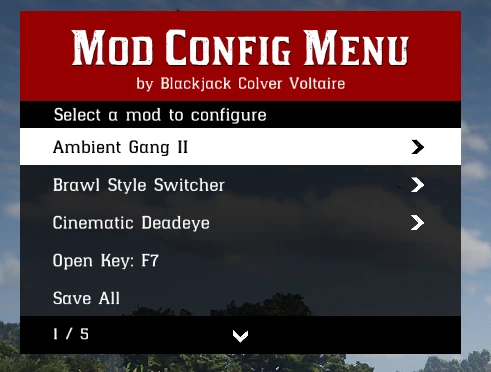
A simple Mod Configuration Menu, in which authors can expose their own script mod’s settings for the players so that they can change them and customize the game to their liking. This is a framework that does nothing on it’s own, but mod authors can use it to add settings to their script mods so player can configure their mod in-game & in-realtime. Any of my future script mod will integrate MCM
Features
Every mod that supports the MCM is listed in one menu with its own settings page. The mod name and author are displayed in the title bar.
Settings apply as soon as they are modified, although you might need to save it to .ini so they persist on next load
If a mod’s settings page encounters an error, the MCM disables that page, records the cause in a log file, and leaves the game and all other mods unaffected.
Press F7 to open the menu, you can change this to any key later
Fully optional. Mods continue to function without the MCM (but you’ll miss the customization). Uninstalling it removes only the menu. Uninstalled mods will be removed from the list automatically.
Installation instructions
For users, require scripthook as usual, install to root RDR2 folder
For devs, put MCM_client.h to your project, simply follow the guidelines there
Requirements
AB/V2 ScripthookRDR2
Credits:
Blackjacks420n
Downloads
| Name | Format | Size |
|---|---|---|
| MCM-v1.0.zip | ZIP | 162.72 KB |
To start download click the filename. To open archive files use one of these programs: WinRAR, 7-Zip, WinZip. Some mod archives may need to be extracted before the mods will work.