Please follow me on Patreon
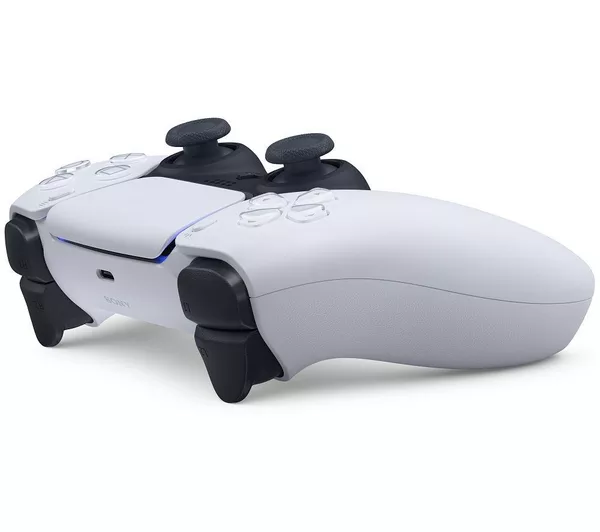
Hey everyone! Today I want to share a tool I’ve created: AC DualSense Adapter. It brings adaptive trigger feedback to the Assetto Corsa series when using a PlayStation 5 DualSense controller on PC, turning your gamepad into a more immersive driving feedback device.
✨ What Is This?
AC DualSense Adapter is a bridge between game telemetry and your DualSense controller. It reads real-time data from AC / ACC / ACR (wheel slip, throttle, brake, etc.) and, via the DSX driver, converts that into trigger vibration and resistance. When you drive with a controller, you can feel the tire state through your fingers.
In short: when your tires slip, the triggers vibrate to warn you.
🎯 Supported Games
Assetto Corsa
Assetto Corsa Competizione (ACC)
Assetto Corsa Rally (ACR)
📊 Core Features
1. Adaptive Trigger Feedback
Right Trigger (R2) — Throttle**: When you apply too much throttle and the tires slip, the trigger vibrates to remind you to ease off.
Left Trigger (L2) — Brake**: When you brake too hard and the tires lock up, the trigger vibrates to remind you to release some brake pressure.
The stronger the slip, the stronger the vibration, so you can better control traction by feel.
2. LED RPM Indicator
The controller light bar changes color based on engine RPM:
Green: Low RPM (approx. 0–70%)
Yellow: Mid–high RPM (approx. 70–85%)
Red: Near redline (approx. 85%+)
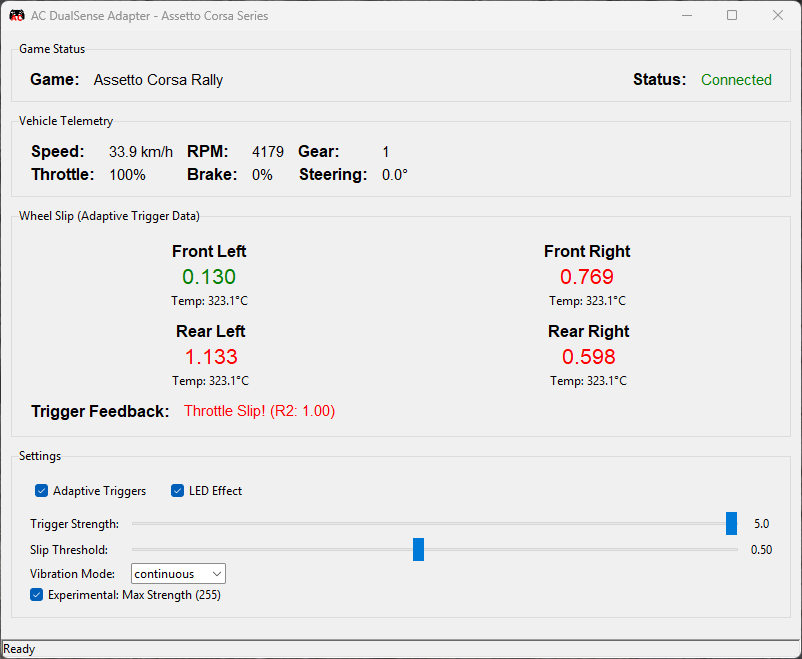
3. Real-Time Telemetry Dashboard
The app includes a small window showing:
Speed, RPM, gear
Throttle, brake, steering angle
Four-wheel slip values- Tire temperatures
💡 Prerequisites
DualSense controller (PS5 controller)
DSX (DualSenseX) – Download: https://github.com/WujekFoliarz/DualSenseY-v2
Windows
🛠️ Basic Usage
Start DSX – Launch DSX and connect your DualSense controller.
Start the game – Launch AC / ACC / ACR and enter a track session (don’t stay in the menu).
Run AC DualSense Adapter – Double-click `AC_DualSense_Adapter_v1.0.0.exe`.
Drive – Adaptive triggers work automatically; no extra setup needed.
⚙️ Common Settings
The app creates `config_ac.ini` on first run. You can also adjust settings in the GUI:
Trigger Strength: 0.1–5.0 — higher values = stronger vibration. Try around 2.0 to start.
Slip Threshold: 0.05–1.0 — lower values = more sensitive. Recommended: 0.15–0.20.
Adaptive Triggers: Check to enable adaptive trigger feedback.
LED Effect: Check to enable RPM light effect.
If you have questions or suggestions, feel free to leave a comment.
Happy driving!
Credits:
aaronfang
Downloads
| Name | Format | Size |
|---|---|---|
| AC_DualSense_Adapter_v1.0.0.zip | ZIP | 62.79 MB |
To start download click the filename. To open archive files use one of these programs: WinRAR, 7-Zip, WinZip. Some mod archives may need to be extracted before the mods will work.