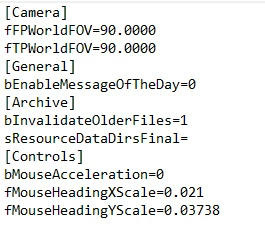
Provides several ini tweaks such as changing FOV, enabling loose files, fixing mouse sensitivity and disabling the message of the day.
If you have a 21:9 monitor try 0.042 in the fMouseHeadingYScale= instead of 0.03738.
If any of these don’t actually work let me know, it’s still early.
Installation:
Place the StarfieldCustom.ini file in your documents/my games/starfield folder, the same place as StarfieldPrefs.ini. Open it and set your desired FOV for both settings.
Changelog:
Credits:
Bulwarkhd
Downloads
| Name | Format | Size |
|---|---|---|
| starfield-ini-tweaks-1-2.zip | ZIP | 412.00 B |
To start download click the filename. To open archive files use one of these programs: WinRAR, 7-Zip, WinZip. Some mod archives may need to be extracted before the mods will work.