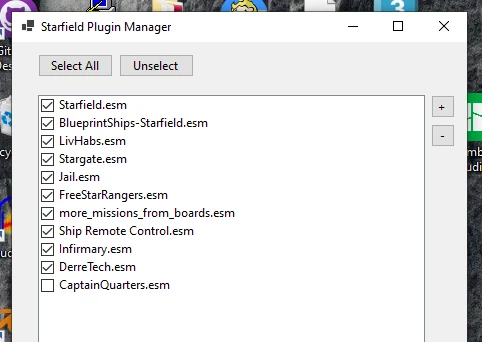
A small portable program that automates activation, deactivation, and sorting of esm’s and esp’s for Starfield
For Vortex users:
Click on “Dashboard” on the top left
Go to the “Tools” section and click the large “+” and hit “New…”
You can name it whatever you want. I went with “Plugins.txt Manager”
Click the folder icon next to the “Target” field and select this mods .exe
To use:
Start the program, on first startup it will open a window asking for the Starfield / Data directory where your ESM’s live
Use the checkboxes to enable / disable the plugins you want, then hit save
To Sort:
Select the esm to sort, then click the +/- buttons to the side and hit save
Requires the .NET Desktop Runtime 6.0 (Will prompt to install if missing)
Credits:
LilithMotherOfAll
Downloads
| Name | Format | Size |
|---|---|---|
| Plugin-Manager-1-2.zip | ZIP | 68.30 KB |
| Plugin-Manager-1-3.zip | ZIP | 213.48 KB |
To start download click the filename. To open archive files use one of these programs: WinRAR, 7-Zip, WinZip. Some mod archives may need to be extracted before the mods will work.