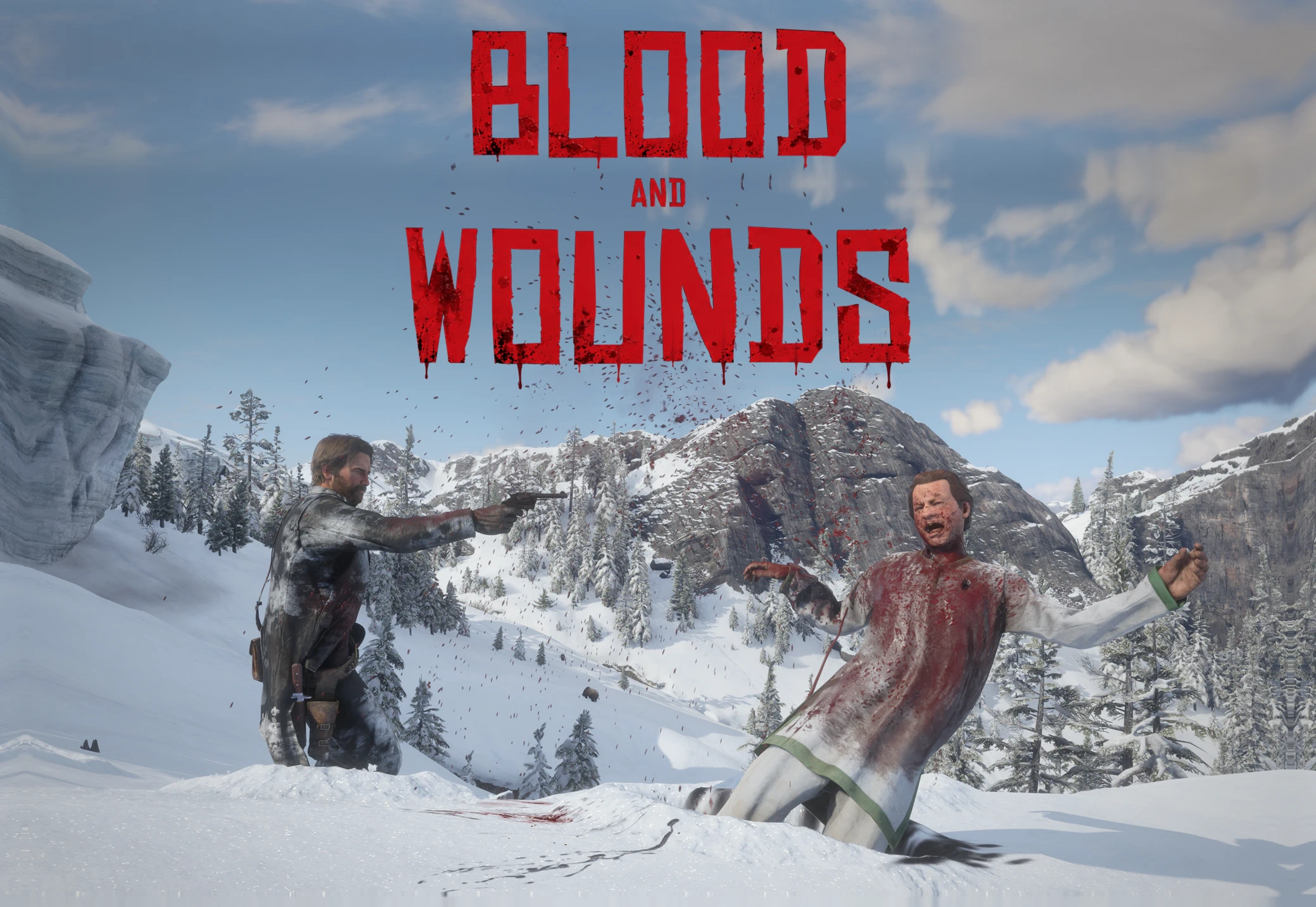
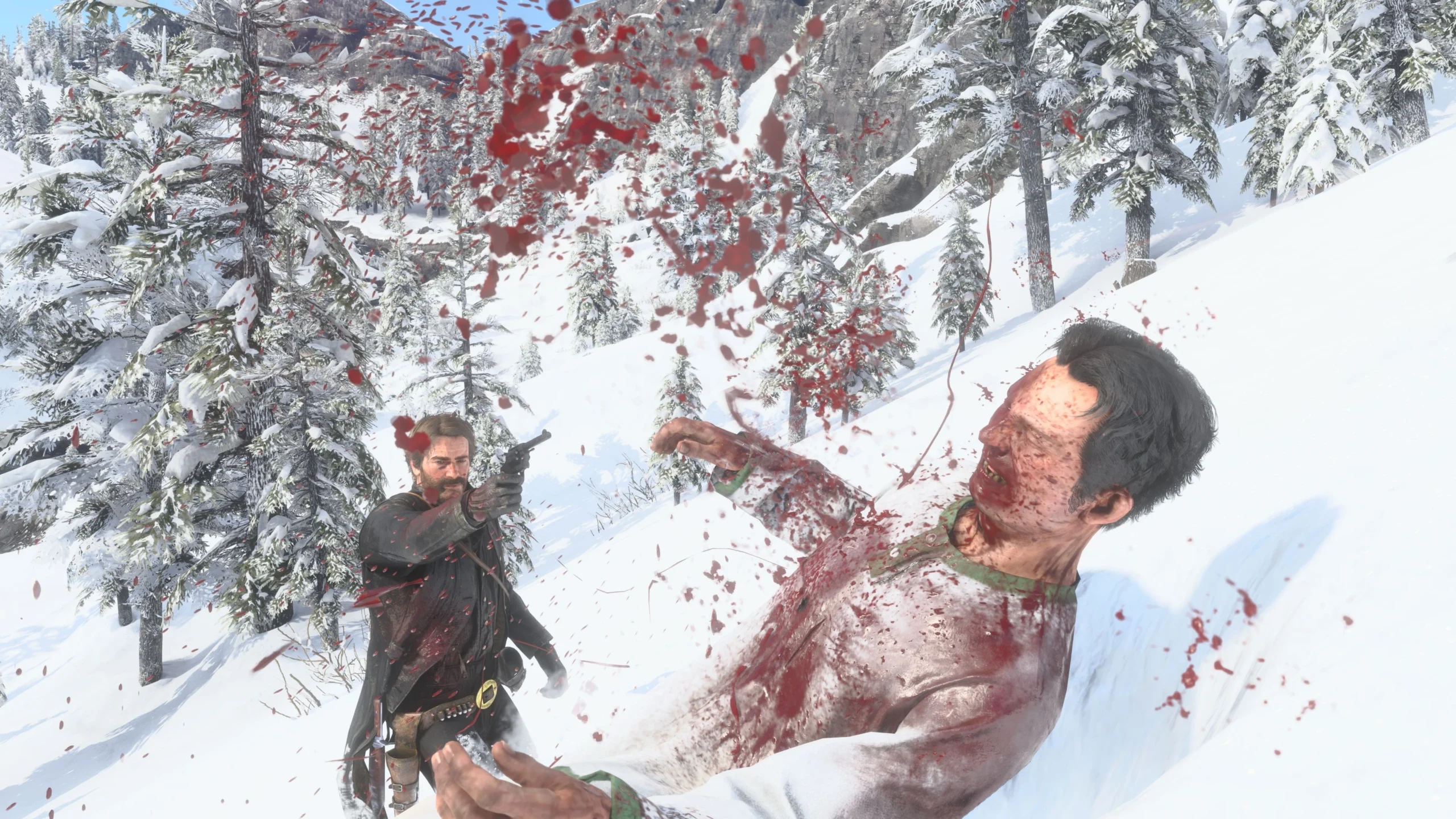
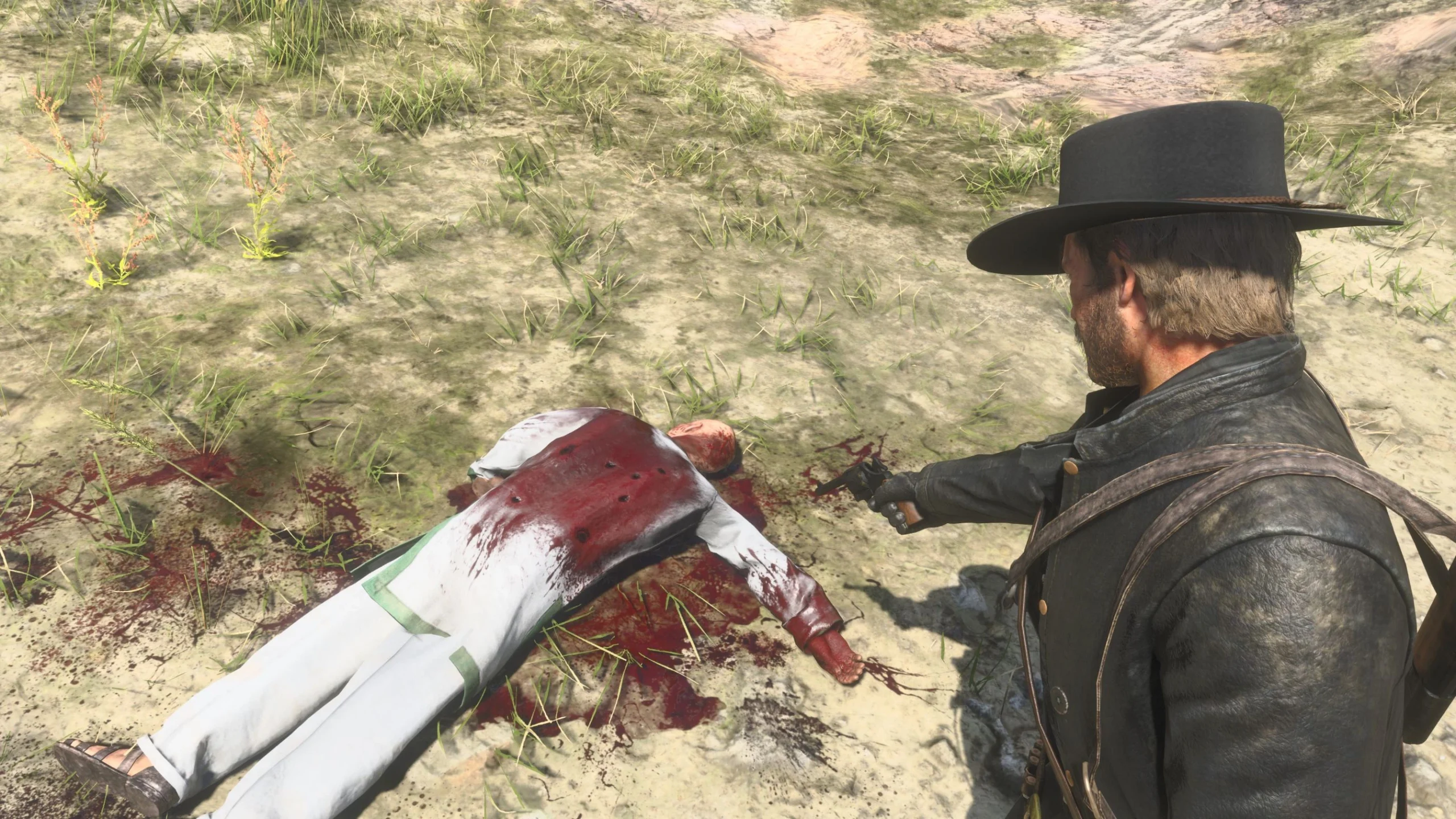
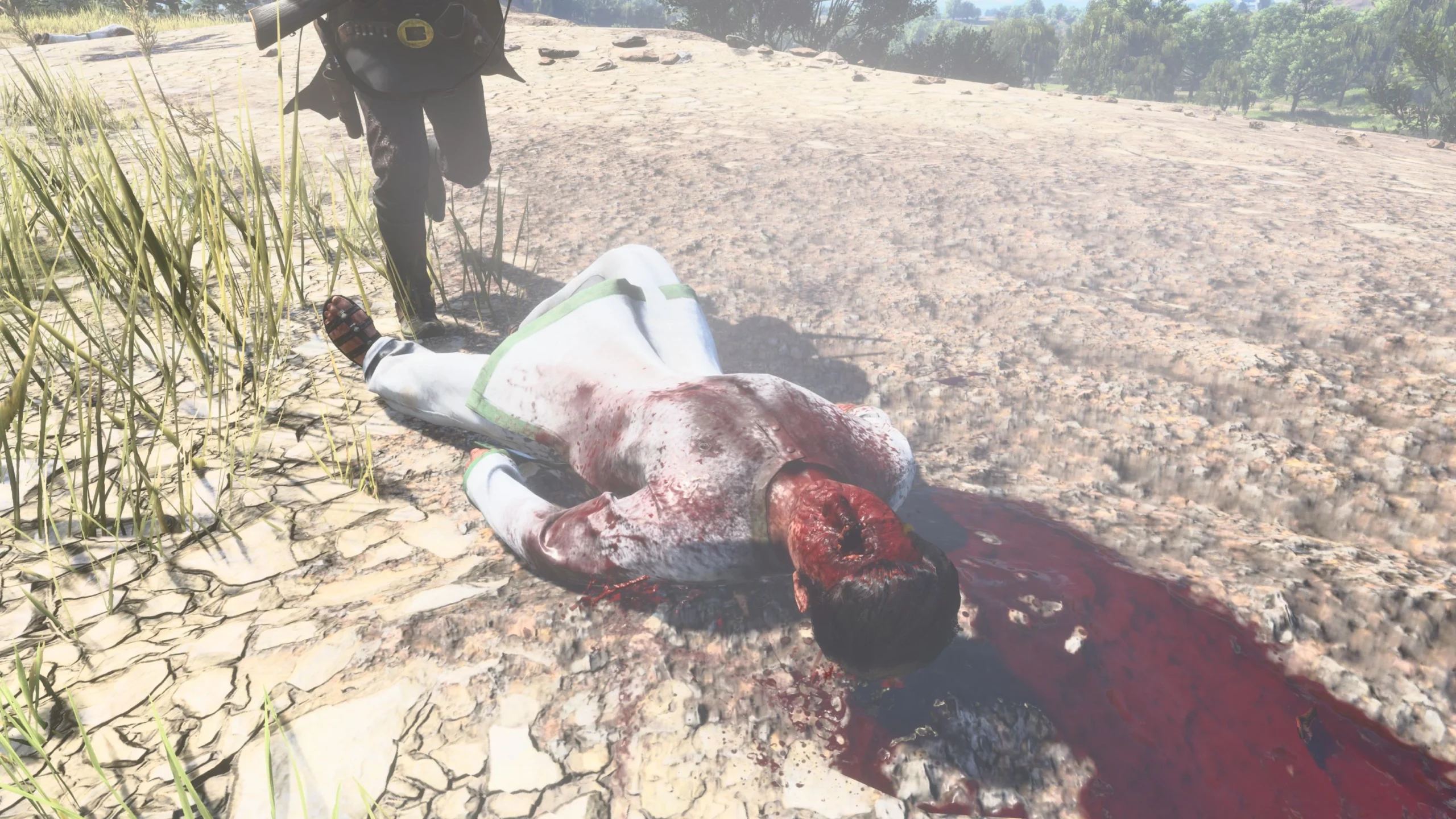
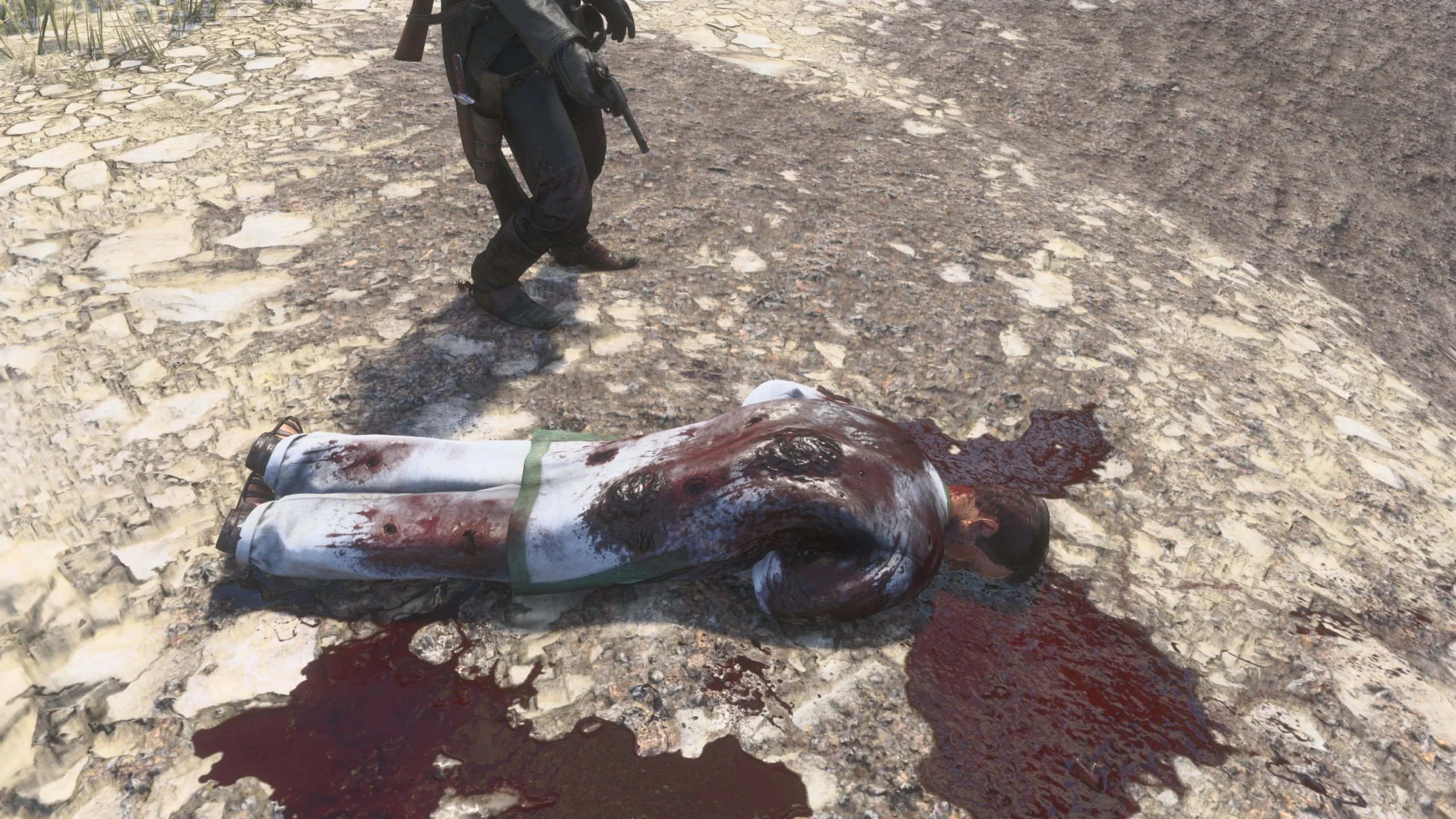
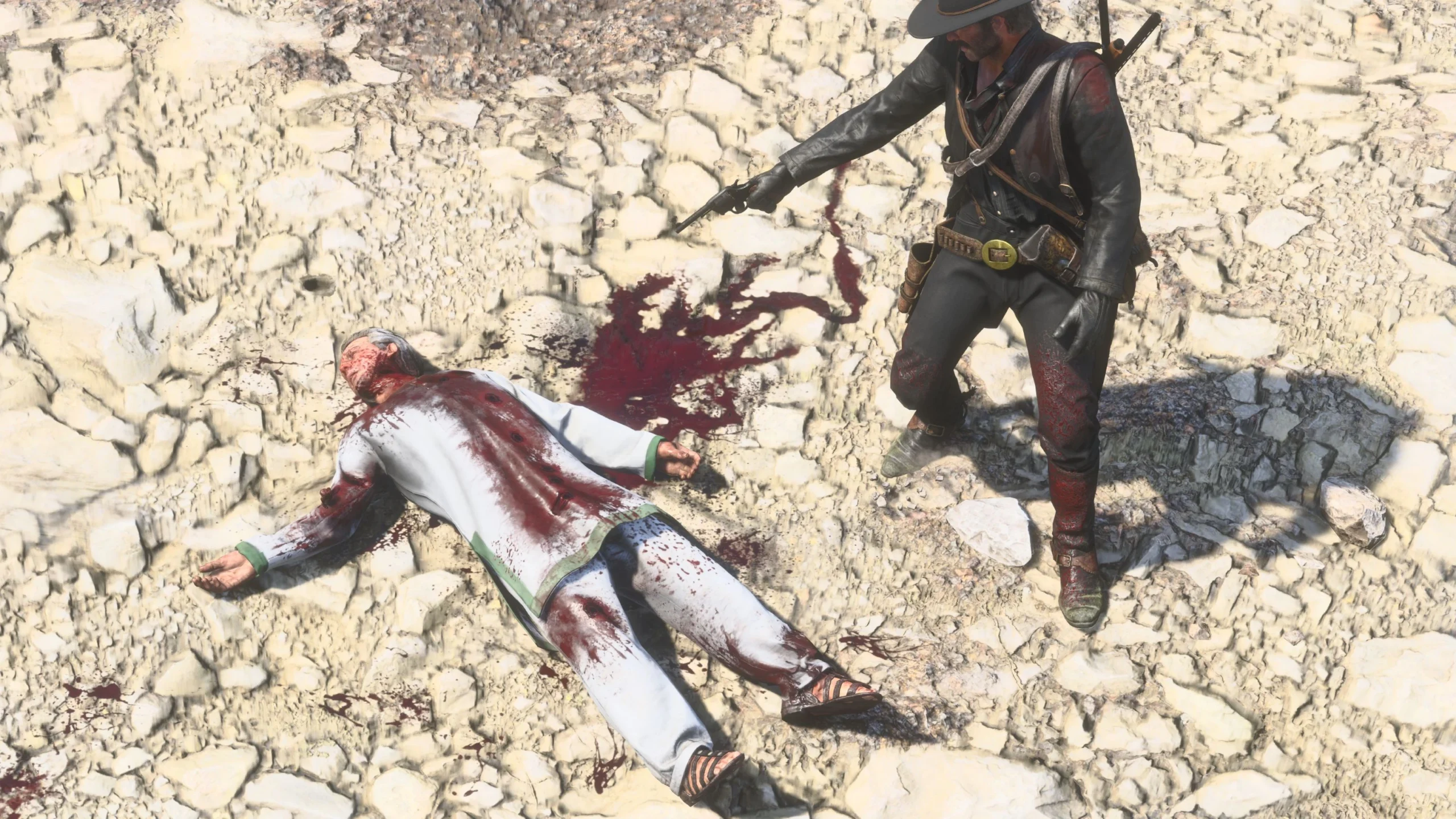
Dynamic bullet wounds, spreading blood and over 400 regional injury profiles. Unlock up to 8× the native per-ped decal capacity, develop wounds through repeated hits, and keep bullet holes visible through heavy bleeding. Strongly recommended alongside PDO Reloaded and Improvements in Blood. Supports Vulkan and DirectX 12.
Blood and Wounds transforms the visible aftermath of gunfights through three connected systems:
Over 400 reviewed fixed wound and blood profiles, selected according to the region hit, weapon, damage and bleeding conditions.
Dynamic blood placed at the impact, allowing animated blood to develop around the places you actually shoot.
Dynamic bullet-wound variations and progression, bringing different appearances to individual hits and increasingly damaged wounds to repeated shots.
And giving all these effects room to coexist: expanded engine decal capacity, supporting up to 512 wound/decal entries per ped and a shared ped-wound pool of 6,000.
From a single handgun wound to repeated rifle hits, arterial bleeding and explosive damage, injuries can build into a detailed, layered aftermath.
The built-in capacity extension substantially increases the engine’s room for bullet wounds, blood and other damage components.
Per ped 64 native, 512 by default
Shared pool 1,500 native, 6,000 by default
Choose 2×, 4× or 8× native per-ped capacity through the INI, alongside up to 4× the shared pool.
Closer ordinary bullet spacing also allows nearby impacts to leave separate marks, helping dense groups of wounds build naturally.
Blood, bullet wounds and other damage components share these slots; visible hole counts depend on the effects used.
The capacity extension is also available separately for players who want expanded limits, closer bullet spacing and bullet-over-blood priority.
Dynamic red blood follows the game’s native impact placement.
Gunshots can leave a quick burst of impact splatter before the wound starts bleeding. Version 1.6 adds 32 native blood patterns, larger buildup after repeat hits, and a slower second layer that can appear after the first stain forms. Thin trails can grow separately while blood soaks into the surrounding fabric.
These effects also work on already-dead human peds, allowing further shots to leave local blood and wounds on corpses.
Eligible ordinary bullet variations replace the original wound request, preserving its impact placement without adding a duplicate ordinary hole.
Different appearances suit different weapons and body regions. Some include protruding damage and blood that develops after impact. Selected shotgun effects can deliberately combine the native shotgun wound with additional gore.
Repeated hits at the same spot can develop through a three-stage wound system:
First hit: a normal wound or an eligible first-hit variation.
Second hit: a chance for a larger or more damaged appearance.
Third hit: the terminal enlarged appearance for supported ordinary firearm hits.
The mod checks a tight match around the original impact, together with the body region and surface direction. Shots elsewhere build their own wound histories.
Higher-stage surface wounds receive priority over earlier appearances, helping the developed wound remain visible.
The reviewed catalogue contains 429 eligible fixed profiles, using the game’s existing injury assets.
These add authored injuries and broader blood coverage through combinations of placement, weapon, accumulated damage and bleeding conditions.
Head, neck, chest, back, arms, hands, pelvis and legs have their own treatment rules. Heavy shotgun and explosive damage can combine suitable physical injuries with additional blood coverage.
Fixed treatments primarily build on living victims. Eligible appearances can also continue briefly after a witnessed death, allowing fatal bursts to finish applying their visual aftermath.
When supported PDO bleeding signals are detected, Blood and Wounds can add suitable regional blood coverage.
Neck bleeding can extend onto the upper chest. Head bleeding can produce appropriate face and neck coverage. Relevant treatments can also include bloodied hands.
Brief spurts, dripping and sustained streams can contribute to different treatments according to the supported signal and wound conditions.
PDO supplies the bleeding particles and reactions; Blood and Wounds adds the accompanying wound and blood appearances.
Drawing priority places supported bullet and gore wounds above blood layers, with later wound stages above earlier surface appearances.
This addresses the blood-layering problem encountered during testing where heavy arterial coverage concealed new bullet holes, making further shots appear to leave no wound.
Additional head blood is also bounded to reduce repeated coverage once that surface has accumulated enough applications.
Handguns, repeaters, rifles, snipers and shotguns use different wound-selection rules.
High-velocity and split-point ammunition can give eligible first hits a more damaged appearance. Bows retain their native wounds with additional blood treatment, while explosives use their own heavy injury and blood combinations.
Distance cutoffs and variation chances are configurable, allowing the enhanced appearances to focus on the close and medium ranges where their detail is most visible.
Automatic melee additions are excluded.
For the combined experience, we strongly recommend using BOTH Ped Damage Overhaul Reloaded and Improvements in Blood alongside Blood and Wounds. PDO adds injury reactions, bleedouts and visceral blood effects; Improvements in Blood adds blood textures, splatters and pools. Blood and Wounds brings the impact-placed wounds, spreading blood, wound progression and expanded decal capacity that tie the visible damage together.
Use our IIB-Compatible version with Improvements in Blood. Our recommended PDO settings are below.
We strongly recommend PDO Reloaded alongside this mod, with both Visceral Wounds and Visceral Gunshots enabled for the combined appearance.
Tested successfully with PDO’s Visceral Wounds both enabled and disabled.
PDO Reloaded adds injury reactions, bleedouts, authored regional Visceral Wounds and Visceral Gunshot particles.
Blood and Wounds combines its reviewed fixed catalogue with dynamic bullet-wound placement and progression, positional blood on living victims and corpses, expanded capacity and closer bullet spacing.
The two wound systems can work together. Leaving PDO’s Visceral Wounds enabled adds its regional fixed injuries alongside ours for an even more layered appearance.
Recommended settings for that combination:
[PedDamageConfiguration]
EnableVisceralWounds=1
EnableVisceralGunshots=1
Set EnableVisceralWounds=0 if you prefer Blood and Wounds to provide the additional fixed injuries. Both combinations looked good in our in-game testing; this is a visual preference.
Our additional arterial treatments respond to supported PDO blood-effect signals. The dynamic wound, local blood and capacity systems do not require PDO to create their ordinary appearances.
We strongly recommend Improvements in Blood alongside PDO Reloaded and Blood and Wounds for its blood textures, splatters and pools.
Use the supplied IIB-Compatible main version when combining them. BloodAndWounds must win LML’s replacement of projdecal.ymt and projdecalpacks.ymt; LML does not merge these files. Keep Improvements in Blood’s other assets enabled.
Head Bleed compatibility — use V2
In our testing, the original Head Bleed caused blood to cover visible bullet holes. Head Bleed V2 worked successfully alongside Blood and Wounds. If you want to use Head Bleed with this mod, we recommend V2.
If you also use PDO Reloaded, set PdorCompatibility=1 in HeadBleedV2_tuning.ini.
Vulkan and DirectX 12 The same ASI detects either renderer automatically.
Munitions Standalone Enable the compatibility option in BloodAndWounds.ini if you use Munitions Standalone. It is off by default.
Standard: the full wound and blood system using the original game effect base.
IIB-Compatible: the full system prepared for Improvements in Blood.
BloodLust, BloodCrave, and BloodBath compatibility options, with or without Improvements in Blood.
Standalone decal expansion: expanded capacity, closer ordinary bullet spacing and bullet-over-blood priority.
The main mod includes the capacity extension. Install one main option or the standalone extension.
Optional Custom Heavy Blood Adds five custom heavy-bleeding patterns. Install v1.6 Main first, then copy the contents of the matching compatibility folder into your game folder.
Supported configuration: RDR2 PC 1.0.1491.50, Vulkan or DirectX 12, Story Mode.
Requires an ASI loader, ScriptHookRDR2 and Lenny’s Mod Loader. Install these separately.
Fully close the game and choose one installation option.
Copy the contents of the chosen folder into the folder containing RDR2.exe.
For the main mod, enable BloodAndWounds in LML’s Mod Manager. When using a compatibility option, give it priority over the corresponding mods.
Fully restart the game after changing versions or decal-capacity settings.
For the main mod, BloodAndWounds.ini contains the everyday presets. BloodAndWounds.Advanced.ini has exact values for Custom mode.
Do not load BloodAndWounds.asi and NaturalDecalCapacity.asi together: the main mod already includes the extension.
Credits:
Rassermand
Downloads
| Name | Format | Size | Description |
|---|---|---|---|
| Blood-and-Wounds-Main-All-Options-1.6.zip | ZIP | 8.39 MB | Complete mod with all compatibility options included. Choose one folder and drag its contents into your game folder. |
| Standalone-Decal-Expansion-Only-use-main-or-this-1.3.zip | ZIP | 399.43 KB | Standalone decal expansion only. Defaults: 512 decals per ped and 6,000 shared pool. Configurable INI; Vulkan/DX12. Do not use alongside Blood and Wounds; expansion is already included in the main mod. |
| Blood-and-Wounds-Custom-Heavy-Blood-1.6.zip | ZIP | 20.93 MB | Adds five custom heavy-bleeding designs. Install v1.6 Main first, then copy the contents of the matching compatibility folder into your game folder. |
To start download click the filename. To open archive files use one of these programs: WinRAR, 7-Zip, WinZip. Some mod archives may need to be extracted before the mods will work.