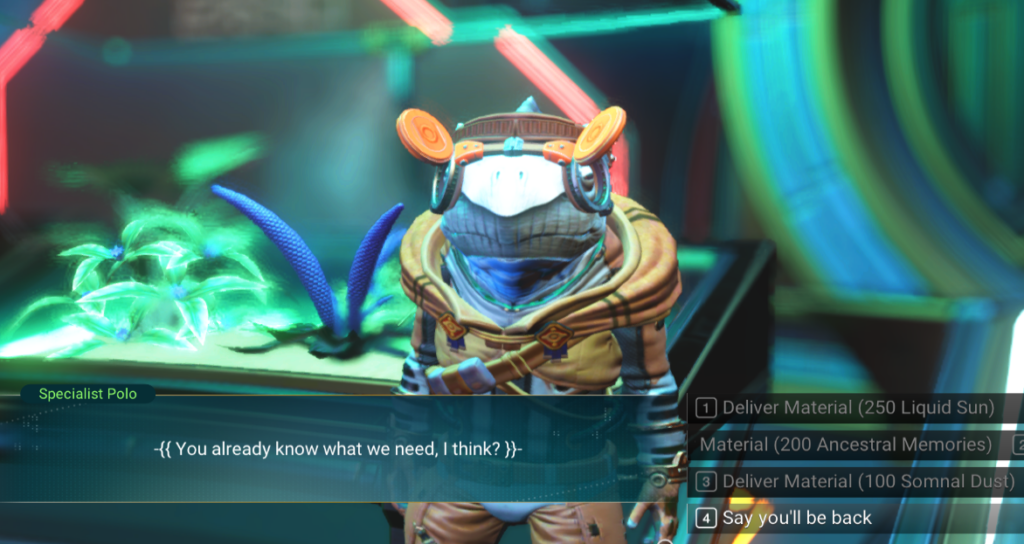
Keep Talking Polo E7 makes Polo’s Expedition 7 Leviathan dialogue stay open when turning in Liquid Sun, Ancestral Memories and Somnal Dust.
Helps out a bit when turning in a lot of Liquid Sun, Ancestral Memories and Somnal Dust to Polo.
Manual Installation:
Drag the PAK file into your MODS folder.
MODS folder should be located in No Man’s Sky/GAMEDATA/PCBANKS/MODS
Mod Edits:
METADATA/SIMULATION/MISSIONS/SEASONALMISSIONTABLE.MBIN
Tutorial for Updating / Combining Mods :
Requirements: AMUMSS.
Step 1 : Run BUILDMOD.bat until AMUMSS and MBINComplier say they are up to date.
: (If there are multiple updates, you might need to run it more than once.)
Step 2 : Place the lua scripts into AMUMSS\ModScript folder.
: (More than one lua script can be place in ModScript for combining them into one pak file)
Step 3 : Run BUILDMOD.bat, Answer the questions Y or N.
: No errors, warnings, or notice should be detected.
: If there are conflicts check the REPORT.lua file for the list of conflicts.
: (Read the README – Creating a Patch for existing MOD PAKs.txt to learn how to make a patch for a lua script and mod pak file.)
: (If you’re combining lua scripts that edit the same file but not the same lines, conflicts in ModScript folder can be ignore)
Step 4 : Open AMUMSS/CreatedModPAKs folder and copy the pak file to your NMS MODS folder.
: (This step is skippable if chosen Yes to copy to game’s MODS folder when running BUILDMOD.bat)
Credits:
JustRuthless – maintenance by Babscoole
Downloads
| Name | Format | Size |
|---|---|---|
| Keep-Talking-Polo-E7-3-97.zip | ZIP | 88.28 KB |
To start download click the filename. To open archive files use one of these programs: WinRAR, 7-Zip, WinZip. Some mod archives may need to be extracted before the mods will work.